How do I save Pinterest video to gallery?
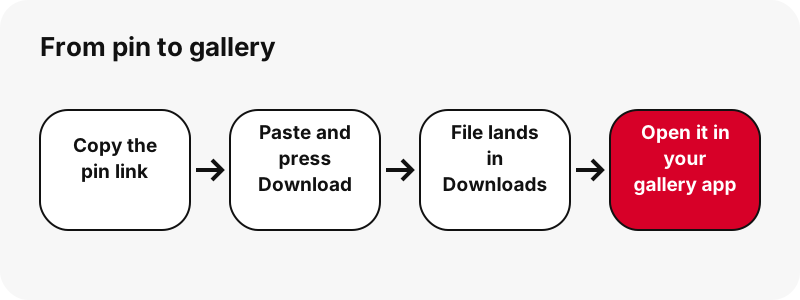
Download the MP4 with the box above, then find it in your phone's downloads and open it in your gallery app. That is the whole job: there is no special gallery button on any website, because a browser hands every download to the phone's normal download folder first.
So the real question behind "save Pinterest video to gallery" is: where does my phone put downloads, and how does my gallery app see them? The answer differs between iPhone, stock Android, Samsung and Xiaomi. Each section below answers it for one of them, using only what Apple, Google, Samsung and Xiaomi say on their own help pages.
Before you start, check that the pin is a video. If it is a picture, the result card tells you ("This pin is a picture, not a video. Here is the original image.") and gives you the original image instead. A GIF pin stays a .gif file, because Pinterest stores no MP4 copy of it.
What does "gallery" mean on each phone?
"Gallery" is a different app on each phone, and the download folder is a different place. This table puts the two side by side, with the official page for each line. It is the fastest way to know where to look.
| Phone | Where the MP4 lands | Gallery-type app | Official source |
|---|---|---|---|
| iPhone / iPad (Safari) | Files › Downloads (or iCloud Drive › Downloads) | Photos › Recently Saved shows items saved from Safari | Apple 102440, Apple Photos |
| Android (Chrome) | Default download location; Files app | Google Photos › Collections › On this device | Chrome Help, Google Photos Help |
| Samsung Galaxy | My Files › Downloads | Gallery app (pictures, videos, albums) | Samsung, Samsung Gallery |
| Xiaomi / Redmi / POCO | File Manager › Download | File Manager › Video category lists MP4 | Xiaomi, Xiaomi File Manager |
Notice the pattern: on every phone the browser download lands in a Downloads folder first. The gallery app may or may not show that folder automatically. When it does not, you open the file from the files app, and it plays or opens from there.
How to save Pinterest video to gallery on Android
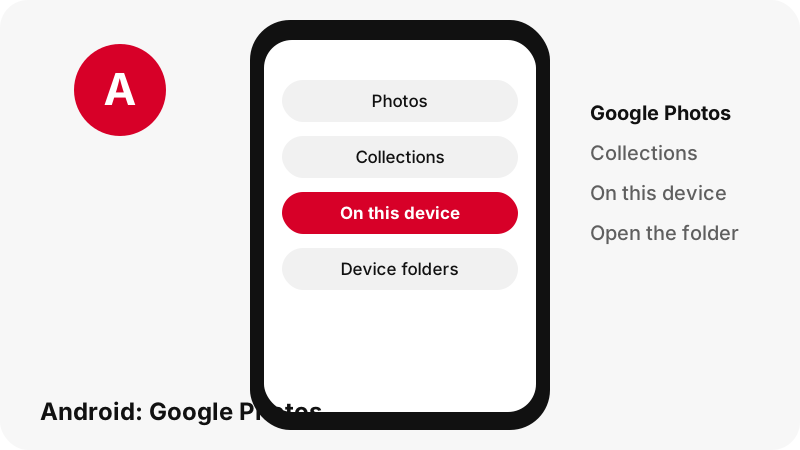
On Android with Chrome, the MP4 goes to your default download location, and Google Photos can show it through its device folders. Google's Chrome help says a downloaded file "will be saved in your default download location", and that the Files app shows everything you downloaded.
- Download the MP4 with the box above in Chrome.
- To check it arrived, tap More at the top right of Chrome, then Downloads.
- Or open the Files app: Google's Files help says the Recents section shows recently downloaded files.
- Open Google Photos, tap Collections at the bottom, then On this device.
- Open the device folder that holds your download, if Google Photos lists it.
Google's Photos help page puts the logic in one line:
“If you’re missing photos or videos from other apps or devices, check your device folders.”
Google does not name the exact folder path on its pages, so we do not invent one. If the folder is not listed in Google Photos, play the video from the Files app; it is the same file. The Android download guide covers the download part in more detail.
How do I get it into the Samsung Gallery?
On a Galaxy phone, open My Files and go to Downloads: Samsung says downloaded files are "typically saved in the My Files app by default". From there, tap the MP4 to play it.
- Download the video with the box above in your browser.
- Open the My Files app.
- Tap Downloads. Samsung's Irish support page notes that a file downloaded from the internet appears under Downloads.
- Tap the MP4 to play it. Samsung says My Files lets you view images, videos, audio files and documents.
Samsung's Gallery help page says the Gallery app lets you view, edit and manage pictures, videos and albums on a Galaxy device. We did not find a Samsung page that says browser downloads appear in Gallery on their own, so we will not promise that. If the video is not in Gallery, it is still in My Files › Downloads.
For a Samsung-only walkthrough of the download itself, see download Pinterest videos on Samsung.
How to save a Pinterest video on Xiaomi, Redmi and POCO
On Xiaomi phones, browser downloads go to File Manager › Download. Xiaomi's support article states it directly: "System download (browser, email attachment download, etc.): file manager/Download".
- Download the MP4 with the box above.
- Open the File Manager app (Xiaomi says it is pre-installed and usually has a folder icon).
- Open the Download folder, or tap the Video category.
- Tap the MP4 to play it.
Why does the Video category work? Xiaomi explains that File Manager sorts files by their extension, and that the Video category covers "MP4, avi, 3gpp and other video files". Every video PinDownload gives you ends in .mp4, so it shows up there.
Xiaomi's pages do not say whether the Gallery app shows the Download folder, so we leave that out. The Xiaomi guide has the download steps.
How do I get a Pinterest video into Photos on iPhone?
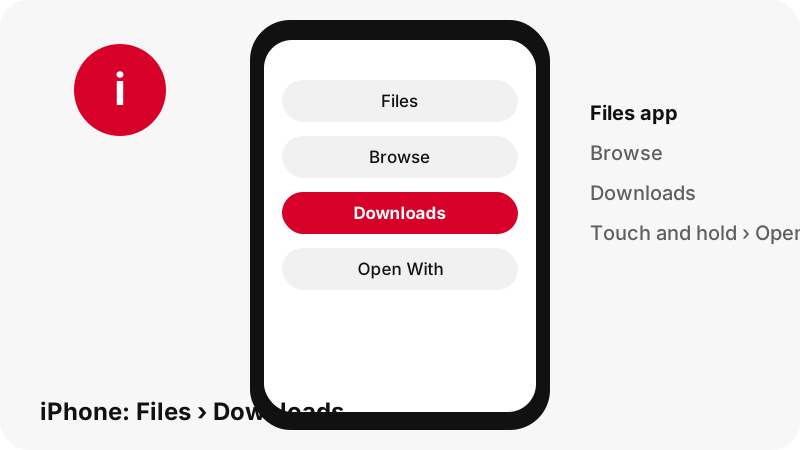
On iPhone, a video you download in Safari goes to the Files app first. Apple says: "If you download a file onto your iPhone or iPad from the internet, you can find it in your Downloads folder in the Files app." Safari can save to iCloud Drive or to the iPhone itself, chosen in Safari settings.
Apple's Photos guide adds a second place to check:
“You can find all the photos and videos you’ve saved from other apps—like Messages, Safari, and Mail—in the Recently Saved collection.”
- Download the MP4 in Safari. Right after, the Downloads button next to the Safari search field lists it.
- Open the Files app and go to Downloads.
- Touch and hold the file and tap Open With to choose the app (Apple's Files guide).
- In Photos, look in Recently Saved for photos and videos saved from Safari.
One honest gap: we did not find an Apple page that documents a share-sheet step to move an MP4 from Files into Photos, so we do not describe one. The iPhone guide covers Safari and Chrome downloads in full.
Why is my saved video not showing in the gallery?
Almost always because it is in the Downloads folder, not in the gallery's own folders. Here are the causes we see most often, each with its fix.
- It is in Downloads. Open Files (iPhone, Android), My Files (Samsung) or File Manager (Xiaomi) and look in Downloads.
- Safari saved to iCloud Drive. Apple lets you pick iCloud Drive or On My iPhone. Check Files › iCloud Drive › Downloads.
- Google Photos hides the folder. Open Collections › On this device and look through the device folders.
- The download did not finish. Check Chrome › More › Downloads or the Safari Downloads button.
- The link expired. Download links work for 1 hour. After that the server answers "Link expired. Paste the Pinterest link again."
- It was a picture or GIF. The result card says so, and the file is a .jpg, .png, .webp or .gif, not an MP4.
If the file plays but has no sound, that is a different problem: Pinterest video with no sound explains how to tell whether the pin has a sound track at all. For anything else, the troubleshooting page maps every message to a fix.
Which size should I save to my gallery?
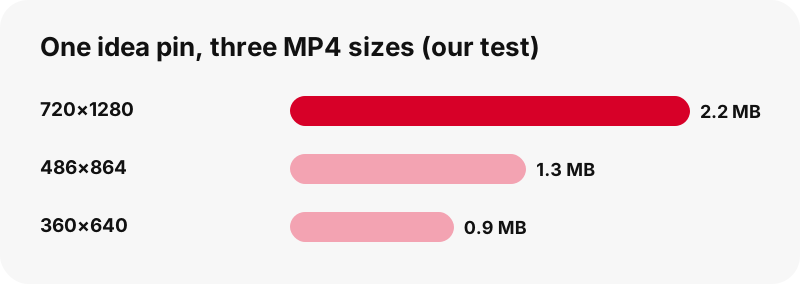
Pick the largest MP4 unless you are short on space or mobile data. Every button shows the real size before you tap, so you can choose with numbers, not guesses. These are measured files from our tests on 2026-10-24.
| Pin (our test) | File | Size |
|---|---|---|
| Idea pin, 9.5 s | MP4 720×1280 | 2.2 MB |
| Idea pin, 9.5 s | MP4 486×864 | 1.3 MB |
| Idea pin, 9.5 s | MP4 360×640 | 0.9 MB |
| Idea pin, 90 s | MP4 720×1280 | 20.9 MB |
| Classic video pin, 13 s | MP4 576×1024 | 3.3 MB |
| Classic video pin, 7 s | MP4 720×1280 | 0.4 MB |
Two things stand out. Length matters most: the 90-second idea pin is about ten times bigger than the 9.5-second one. And the smaller copies (486×864 and 360×640) only appear for idea pins, because Pinterest stores that ladder of sizes for them.
720×1280 is the top. In our tests, even an idea pin uploaded at 1080×1920 had no file larger than 720×1280 on Pinterest's servers. The quality explainer shows why.
Will the video in my gallery have a watermark or lower quality?
No watermark is added, and the quality is exactly what Pinterest stores. PinDownload streams the original MP4 from Pinterest's servers through a download link; it does not re-encode, crop or stamp anything on the video.
What you see in your gallery is the same H.264 video with AAC sound that Pinterest serves. The Wikipedia article on the MP4 file format describes MP4 as a container that can hold video, audio and text, which is why one file carries both picture and sound.
If a creator burned their own logo or text into the clip before uploading, that stays: it is part of the picture, not something added later. The no-watermark page explains the difference.
Quality also does not drop when the file moves from Downloads to a gallery app. Opening, playing or backing up the file does not change it. The only time a copy gets smaller is when an app re-compresses it on upload, which happens outside PinDownload.
Can I save Pinterest pictures, GIFs and thumbnails to the gallery too?
Yes. The same box saves every kind of public pin, and the files land in the same Downloads folder as videos. Each page of the site simply puts a different button first.
- Image pins: the original upload, not the 736-pixel preview (in our tests an original was 1080×1521, 160 KB).
- GIF pins: the original animated .gif plus a still JPG.
- Thumbnails: the first frame of a video pin at full size, as a JPG.
- Boards: up to 50 pins of a public board, saved one by one.
Pictures follow the same rules as videos: they go to Downloads first. On a Mac, Apple notes that Preview shows an animated GIF frame by frame, while Quick Look in Finder plays it. Phones vary, so test one GIF before saving a whole set.
Save for yourself, ask before reposting
Saving a public video to your own gallery for personal viewing is one thing; posting it again as your own is another. Pinterest's copyright policy explains how rights owners can report infringing content and that Pinterest may remove it.
If you want to reuse a clip in your own post, message the creator first. Most creators are happy to be asked, and a credit costs nothing. The is it legal page goes through the main questions with official sources.
PinDownload is an independent tool, not affiliated with Pinterest. It reads public pins only and never asks for your Pinterest login.
Frequently asked questions
Can I save a Pinterest video straight to my gallery?
Not in one step from a website. The browser saves the MP4 to your Downloads folder first; you then open it from Files, My Files or File Manager, or find it in your gallery app if it shows that folder.
Where is the video after I download it on Android?
In your default download location. Open the Files app (Recents shows recent downloads) or Chrome › More › Downloads.
Why is the video not in Google Photos?
Google Photos shows downloads through device folders. Tap Collections › On this device and look for the folder; if it is not there, play the file from the Files app.
Where is the video on a Samsung phone?
In My Files › Downloads. Samsung says files downloaded from the internet appear under Downloads.
Where is the video on a Xiaomi or Redmi phone?
In File Manager › Download. The Video category also lists MP4 files, because File Manager sorts files by extension.
Where is the video on iPhone?
In the Files app › Downloads, or iCloud Drive › Downloads if Safari is set to save there. Apple also says items saved from Safari appear in Photos › Recently Saved.
Does saving to the gallery lower the quality?
No. Moving or opening the file does not change it. You get the MP4 exactly as Pinterest stores it, up to 720p.
Is a watermark added?
No. PinDownload adds nothing. Text a creator put into the video before uploading stays, because it is part of the picture.
Which size should I pick for my gallery?
The largest MP4 for the best picture. For idea pins, the 486×864 and 360×640 copies are smaller if you are short on space or data.
Is PinDownload part of Pinterest?
No. PinDownload is an independent tool and is not affiliated with Pinterest. It only reads public pins.
Do I need an app to save Pinterest videos to my gallery?
No. It works in your phone's browser. You can add PinDownload to your home screen, but nothing is installed.
Can I save a private pin to my gallery?
No. Private pins and private boards cannot be read without the owner's login, and PinDownload never asks for it.
Guides
Video — Paste a pin link and save the video as MP4, up to 720p.
Sources
- Find downloaded files on iPhone or iPad — Apple
- Find recently saved photos and videos on iPhone — Apple
- Customize your Safari settings on iPhone — Apple
- Find and view files and folders in Files on iPhone — Apple
- Download a file in Chrome (Android) — Google
- Find and open files with Files by Google — Google
- Find missing photos and videos in Google Photos — Google
- Where to find downloaded files on a Samsung phone — Samsung
- Use the Gallery app on a Galaxy device — Samsung
- Where are downloaded files saved on a Xiaomi phone — Xiaomi