What do you need before you start?
You need an iPhone with Safari, a public Pinterest video pin and a little free storage. That is the whole list: no App Store download, no Pinterest login and no sign-up on our side. Chrome on iPhone works too, with one extra step covered further down.
The question of how to download Pinterest videos on iPhone usually comes from one gap: the Pinterest app lets you save a pin to a board, but a board is not a file. PinDownload reads the public pin data and hands Safari the MP4 itself, so the clip plays offline, in a plane or on a weak signal.
- Works: classic video pins, idea pins (the short vertical ones), carousel slides and pin.it short links.
- Does not work: pins on private boards, pins from a private profile, and anything that needs your login.
- Not needed: an app, an account, a VPN, or a shortcut file.
If you were looking for a store app, read why there is no PinDownload app and how the web version can sit on your Home Screen instead.
Where do Pinterest downloads go on iPhone?
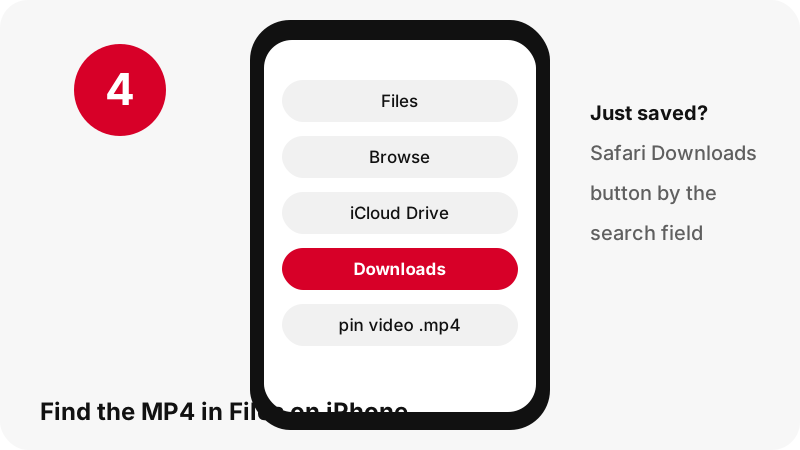
They go to the Downloads folder of the Files app. Apple's page on finding downloads on iPhone or iPad says it in one line, and its steps are: open Files, tap Browse, tap iCloud Drive, then tap Downloads.
“If you download a file onto your iPhone or iPad from the internet, you can find it in your Downloads folder in the Files app.”
iCloud Drive or On My iPhone?
Both are possible. In Safari settings (Settings › Apps › Safari › Downloads) you choose iCloud Drive, On My iPhone or Other. Apple notes that iCloud Drive lets you open the file on any iPhone, iPad or Mac signed in to the same Apple Account. On My iPhone keeps it in the phone's own Downloads folder.
Right after the download
You do not have to leave Safari. Tap the Downloads button next to the search field and the newest file is at the top; tap it to play. Apple's Files guide for iPhone describes the longer route, Files › Browse › Downloads, which also lists older files.
| Safari download setting | Where the MP4 lands | On your other Apple devices? |
|---|---|---|
| iCloud Drive | Files › Browse › iCloud Drive › Downloads | Yes, on any iPhone, iPad or Mac with the same Apple Account |
| On My iPhone | Files › Browse › On My iPhone › Downloads | No, this iPhone only |
| Other | The folder you picked in Files | Depends on the folder you chose |
Which file should you pick on mobile data?
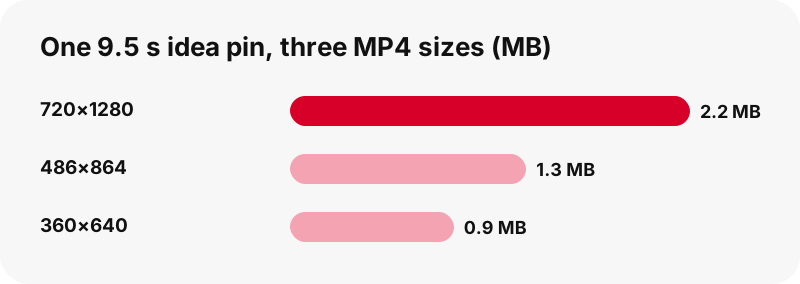
Pick the biggest MP4 on Wi-Fi and a smaller one on mobile data. For idea pins, the result card offers three H.264 files from the same clip: about 720×1280, 486×864 and 360×640. Classic video pins usually come with a single MP4 at the size Pinterest stores.
The sizes below were measured with the tool on 2026-10-24. They are examples, not promises: a longer or busier clip weighs more. The card always shows the real number before you tap, so you never guess.
| Pin we tested | File offered | Size |
|---|---|---|
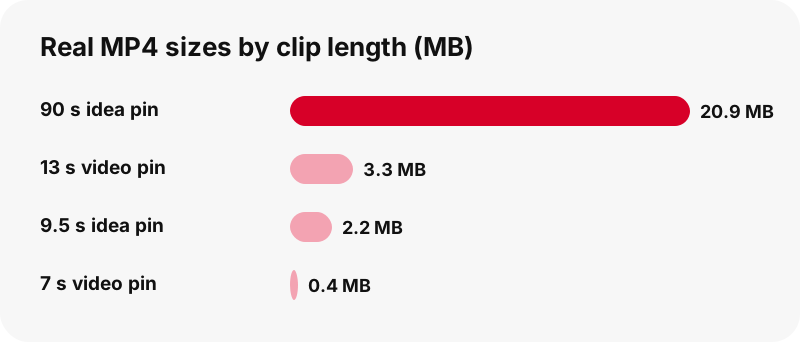
| Idea pin, 9.5 s | MP4 720×1280 | 2.2 MB |
| Idea pin, 9.5 s | MP4 486×864 | 1.3 MB |
| Idea pin, 9.5 s | MP4 360×640 | 0.9 MB |
| Idea pin, 9.5 s | Sound only (M4A) | 80 KB |
| Idea pin, 90 s | MP4 720×1280 | 20.9 MB |
| Classic video pin, 13 s | MP4 576×1024 | 3.3 MB |
On an iPhone screen held upright, 486×864 still looks clean for recipes, tutorials and outfit clips. Keep 720×1280 for anything you plan to edit or cast to a TV.
Can you put a Pinterest video in the Photos app?
Sometimes, but we will not promise a button that Apple does not document. What Apple does say is that photos and videos you save from Safari, Messages and Mail appear in the Recently Saved collection in Photos. An MP4 that Safari downloads through its download manager waits in Files › Downloads.
From Files you are still in control: touch and hold the MP4, tap Open With and choose the app you want, as Apple's Files guide explains. You can also share it straight from Files to Messages or AirDrop without moving it at all.
We tested the download itself, not every way iOS can move a file afterwards. If your iPhone shows an option to save the video to Photos, it is an iOS feature, not something PinDownload adds.
Our separate guide to saving a Pinterest video to the gallery compares this step across iPhone, Android and Samsung phones.
Does it work in Chrome on iPhone?
Yes. The tool runs in any modern browser, so Chrome on iPhone reads the pin and shows the same buttons. The difference is the save step: Google's Chrome help for iPhone and iPad says to tap the save option and choose Files on the “Save in…” screen.
Safari or Chrome: which is simpler?
Safari is one step shorter, because its Downloads list sits next to the search field and the file goes to the folder set in Settings. Chrome asks where to put the file each time, which is handy if you sort clips into folders right away.
| Step | Safari on iPhone | Chrome on iPhone |
|---|---|---|
| Read the pin | Paste the link, press Download | Same |
| Save the MP4 | Tap a button; Safari downloads it | Tap a button, then choose Files on “Save in…” |
| Find it again | Downloads button or Files › Downloads | The Files folder you chose |
| Change the default folder | Settings › Apps › Safari › Downloads | Chosen per file |
How do you add PinDownload to your iPhone Home Screen?
Use Safari's Add to Home Screen. Apple's guide to bookmarking a website on iPhone lists the steps: open the site in Safari, tap Share, scroll and tap Add to Home Screen, then tap Add. If the option is missing, tap Edit Actions at the bottom of the list and add it.
- Open pindownload.net in Safari.
- Tap Share (in some tab layouts it sits behind the page menu first).
- Tap Add to Home Screen. Apple also offers Open as Web App to use the site as if it were an app.
- Tap Add. The icon now opens the downloader in one tap.
The icon opens the website itself, as a web app in its own window when Open as Web App is on, so there is nothing to update from a store and no store permissions to grant. Remove it like any icon when you no longer need it.
How much iPhone storage does a Pinterest video use?
Less than you might fear: short pins are a few megabytes. In our tests a 7-second classic pin was 0.4 MB and a 90-second idea pin was 20.9 MB at 720×1280. Length matters far more than the pin type.
To see what is really free, Apple's storage check for iPhone and iPad says to open Settings, tap General, then tap iPhone Storage. The list there shows which apps take the most space, so you can see whether videos are the problem before deleting anything.
Tidy up from Files: open Downloads, touch and hold a clip you have already watched and delete it. Nothing is stored on our side, so deleting your copy is the only cleanup there is.
Why is the video 720p and not 1080p?
Because Pinterest's encoding ladder for video pins tops out at 720p. In our tests, even an idea pin whose source was listed as 1080×1920 had 720×1280 as its largest playlist entry and MP4. No 1080p or 4K file exists to fetch.
Some download pages advertise 4K anyway. They can only rename or upscale the same 720p picture, which adds megabytes but no detail. We show the exact pixel size on each button instead. The full story, with the playlist ladder, is in Pinterest video quality explained.
One real exception to the 720p ceiling: the video's cover frame. The thumbnail downloader can save it at full size, 1080×1920 in our 90-second test, as a still JPG.
What else can you save from a pin on iPhone?
More than the video. The same box reads pictures, GIFs, carousels and the sound track, each with its real size shown first. Here is what works on iPhone and what does not, without the marketing gloss.
| You want | What you get | Works? |
|---|---|---|
| The video | MP4 (H.264 + AAC), up to 720p | Yes |
| Only the sound | M4A with the original AAC track, cut on your iPhone, not an MP3 | Yes |
| The cover image | JPG first frame and pin cover | Yes |
| A picture pin | The original upload, not the 736 px preview | Yes |
| A GIF pin | The original .gif plus a still JPG | Yes |
| A pin from a private board | Nothing: we cannot read it | No |
| 1080p or 4K | Not stored by Pinterest | No |
For idea pins with several pages, see the idea pin and Reels-style downloader; each page gets its own buttons.
What if nothing downloads on your iPhone?
Start with the message on the card, because it names the cause. “Pin not found. It may be private, deleted, or the link is incomplete.” means the pin is not public or the link was cut. Copy it again from the share icon and paste the full link.
- Button stopped working: download links expire after one hour. Paste the pin link again for fresh ones.
- Downloaded but not visible: check iCloud Drive › Downloads as well as On My iPhone › Downloads, depending on your Safari setting.
- Still downloading: large clips on a weak signal take time; Safari's Downloads list shows the progress.
- Private pin: no tool can read it without the owner's login. Read why private Pinterest videos cannot be downloaded.
Pinterest's own sharing help shows where the share icon sits under a pin. More fixes are collected in Pinterest video download not working.
Same steps on your other Apple devices
The iPad and Mac versions share the Files and Safari logic but differ in useful ways: the iPad can show Pinterest and Safari side by side, and the Mac keeps files in a normal Downloads folder. See Pinterest videos on iPad and Pinterest videos on Mac, or the download folder for every device.
Frequently asked questions
How do I download Pinterest videos on iPhone without an app?
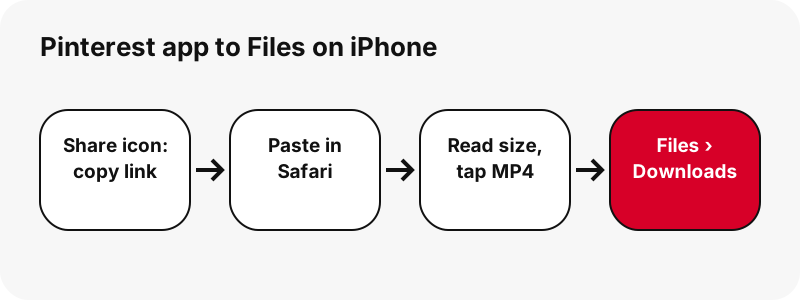
Copy the pin link from the share icon, paste it into the box on this page in Safari, press Download and tap the MP4 button. Safari saves the file to Files › Downloads.
Where is the downloaded Pinterest video on my iPhone?
In the Files app: Browse › Downloads, inside iCloud Drive or On My iPhone depending on Settings › Apps › Safari › Downloads. Right after saving, Safari's Downloads button next to the search field lists it too.
Will the video appear in my Photos app?
Apple lists items saved from Safari under Photos › Recently Saved. An MP4 that Safari downloads normally waits in Files › Downloads, where touch and hold gives you Open With and Share.
Is there a watermark on the video?
PinDownload adds none. You get the MP4 file Pinterest stores for that pin; if the creator put a logo inside the picture, it stays because it is part of the video.
Does the downloaded video keep its sound?
It does whenever the creator's clip has audio, since the MP4 includes its AAC track. For a silent pin, the result card warns you before anything downloads.
Can I save only the audio on iPhone?
Yes, as an M4A file. Your iPhone copies the original AAC track out of the MP4 without re-encoding. It is not an MP3, and nothing is uploaded.
Why does my iPhone download say 720p when the pin looked sharper?
Pinterest's own top MP4 for video pins is 720 pixels wide. What you saw in the app was the same stream; a site promising 1080p or 4K would have to upscale it, so each button here prints the true dimensions instead.
Can I download a whole board to my iPhone?
The board downloader lists up to 50 pins of a public board and prepares them one by one. There is no ZIP, and private boards cannot be read.
Does it work with pin.it short links?
Yes. Paste the pin.it link as it is; the tool follows it to the pin, or to the board if the short link points to one.
Do I need to log in to Pinterest?
No, and we never ask. The tool reads only public pins, the same ones anyone can open without an account.
Is PinDownload part of Pinterest?
No. PinDownload is run independently and has no link to Pinterest, Inc. It can only open pins that are public.
Is it legal to save Pinterest videos on my iPhone?
Keeping a clip for yourself is different from reposting it. Reposting someone else's video can infringe copyright; ask the creator first. Details: is it legal to download Pinterest videos.
Guides
Video — Paste a pin link and save the video as MP4, up to 720p.
Sources
- Where to find downloads on your iPhone or iPad — Apple
- Find your downloaded files on iPhone — Apple
- Customize your Safari settings on iPhone — Apple
- Find recently saved photos and videos on iPhone — Apple
- Find and view files and folders in Files on iPhone — Apple
- Bookmark a website in Safari on iPhone — Apple
- How to check the storage on your iPhone and iPad — Apple
- Download a file (Chrome on iPhone and iPad) — Google
- Share Pins, boards and profiles to social networks — Pinterest