What does the Pinterest GIF downloader give you?
Two files: the original animated .gif exactly as Pinterest stores it, and a still JPG picture of the same pin. Both buttons display the pixel size and the weight read from the file itself, so a 494 KB animation is labelled 494 KB.
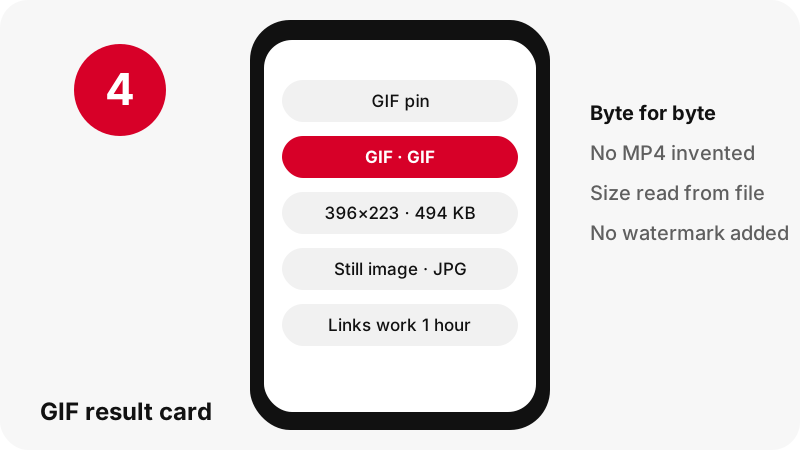
The GIF is passed through byte for byte. PinDownload does not re-encode it, trim frames, change the loop or add a watermark, so the animation plays exactly as it did on Pinterest.
| You paste | What the GIF tool shows | Message on the card |
|---|---|---|
| A GIF pin | Animated .gif + still JPG | None needed |
| A video pin | The MP4 and its pictures | "This pin is a video, not a GIF" |
| A picture pin | The original image | "This pin has no animated GIF" |
| A board link | Board mode, up to 50 pins | Each pin resolved on its own |
The table shows why you never get a mystery file: the card always says what kind of pin you pasted.
Why is there no MP4 version of a Pinterest GIF?
Because Pinterest does not store one for GIF pins. We checked the pin data and the server paths for GIF pins and found only the .gif and still pictures, so PinDownload offers exactly those.
Some tools advertise "Pinterest GIF to MP4". A converted MP4 would have to be made from the GIF on a server, which means re-encoding and a new file that the creator never uploaded. We prefer to hand you the real file and say plainly what does not exist.
If you need a video for a story or a reel, you can convert the downloaded GIF yourself in a video editor. If the pin is actually a short video clip, use the Pinterest to MP4 page instead; it saves Pinterest's own MP4 at up to 720p.
Can I turn a Pinterest video into a GIF here?
No. The Pinterest GIF downloader does not convert video to GIF, and it does not pretend a video pin is a GIF. If you paste a video pin on this page, the card says "This pin is a video, not a GIF: Pinterest stores it as MP4" and offers the MP4 instead.
That message matters more than it sounds. Many "GIFs" you see on Pinterest are short looping video pins, and they look identical in the feed. A real GIF pin carries a GIF badge on our result card; a video pin carries a Video pin badge.
For short looping clips, the reels downloader explains the 720p, 486×864 and 360×640 MP4 choices, which are far lighter than a GIF of the same length would be.
What exactly is a GIF file?
A GIF is an image format that can hold several frames in one file, which is how it animates. CompuServe introduced it in 1987, and MDN lists it as supported by all versions of Chrome, Edge, Firefox, Opera and Safari. Mozilla's reference describes its core design in one line:
“GIF uses the Lempel-Ziv-Welch (LZW) algorithm to losslessly compress 8-bit indexed color graphics.”
"8-bit indexed" means each frame picks from a palette of at most 256 colours. The Wikipedia article on GIF adds that each frame may have its own palette, and that the 89a version of the format added animation delays and transparent backgrounds. Those traits explain both the charm and the limits of Pinterest GIFs.
Why can a tiny GIF outweigh a full photo?
Because GIF stores every frame as a separate indexed picture, and its compression is old and weak for moving images. Size on screen tells you little about size on disk.
In our tests on 2026-10-24, a 128×128 animated GIF pin weighed 1.49 MB, while its still JPG was only 4 KB. Another GIF of 396×223 weighed 494 KB. For comparison, an image pin with a 1080×1521 original photo was 160 KB.
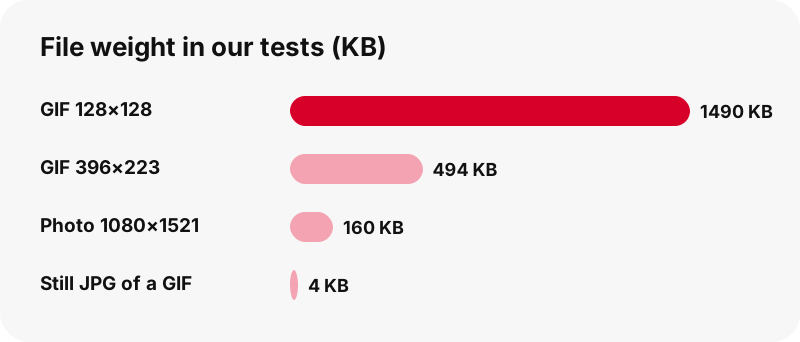
This is why the Pinterest GIF downloader prints the weight on the button. On mobile data, a heavy loop can cost more than a dozen photos, and you may prefer the still picture or Wi-Fi.
What is the still JPG for?
It is a single frame of the pin as a normal picture, useful wherever an animation is unwelcome or unsupported. In our test the still of a 1.49 MB GIF weighed just 4 KB.
- A cover or preview for a slide, a document or a printed page, where GIFs do not move anyway.
- A profile picture or icon, where many services only accept still images.
- A quick reference: you can keep the still on your phone and fetch the full GIF later on Wi-Fi.
- Design work, when you only need one frame to trace or colour-pick.
If you want the cover of a video pin rather than a GIF frame, the thumbnail downloader is the right page: it returns the first frame and the cover at full size.
How do I play a downloaded GIF on a Mac?
Select the file in Finder and press the Space bar: Quick Look plays the animation. Apple's Preview guide states it directly:
“Tip: You can use Quick Look to play an animated GIF by selecting it in the Finder.”
Opening the same file in Preview behaves differently. Apple explains that Preview shows each frame of the animation as an individual still image in the sidebar, which is handy if you want to export one exact frame.
Will the GIF animate on Windows and Chromebook?
Yes. Whatever you save with a Pinterest GIF downloader plays on both, because each system ships an app that opens GIF files. Microsoft lists GIF among the photo formats supported by the Microsoft Photos app, and Google lists .gif among the image file types a Chromebook supports.
On Windows, Edge saves the file to your Downloads folder, whose path you can see under Settings › Downloads. Double-click it to open it in Photos. On a Chromebook, Google notes downloads go to a temporary Downloads folder, so move GIFs you want to keep into Google Drive or My files.
The Pinterest GIFs on PC guide and the Chromebook GIF guide walk through each screen.
How do I save a Pinterest GIF on iPhone?
Use Safari: paste the pin link, press Download and tap the GIF button. Apple says files downloaded from the internet go to the Downloads folder in the Files app, and the Downloads button beside Safari's search field opens them right away.
We want to be precise here. We could not find an Apple help page confirming how the Photos app handles an animated GIF saved from Files, so we do not promise that it will animate in your photo library. What Apple does document is that Files can preview images with Quick Look.
Step-by-step screens are in the iPhone GIF guide. iPad works the same way, with Downloads shown in the Files sidebar.
How do I save a Pinterest GIF on Android?
In Chrome, tap the GIF button and the file goes to your default download location. Google's help says every downloaded file can be found in the Files app, and Chrome's menu › Downloads lists it straight after saving.
To see the GIF next to your other pictures, Google Photos shows images from other apps under Collections › On this device.
Because GIFs are heavy, check the size on the button before you tap if you are on mobile data. The Android GIF guide has the full walkthrough.
Which apps open a Pinterest GIF on each device?
The table gathers what each vendor's own documentation says, and marks clearly where we could not confirm a detail. We prefer an honest blank to a guess.
| Device | Where the .gif lands | Opens or plays it | Source |
|---|---|---|---|
| Mac | Downloads folder | Quick Look plays it; Preview shows frames | Apple |
| Windows | Downloads folder (Edge) | Microsoft Photos supports GIF | Microsoft |
| Chromebook | Downloads (temporary) | .gif is a supported image type | |
| Android (Chrome) | Default download location | Files app; Google Photos device folders | |
| iPhone / iPad | Files › Downloads | Quick Look preview in Files; Photos playback not confirmed | Apple |
Because MDN lists GIF support in every version of the major browsers, opening the file in a browser tab is a reliable fallback on all of them.
How can I tell a GIF pin from a short video pin?
Paste it: the result card badge says GIF pin or Video pin, based on the files Pinterest actually serves. Looking at the feed is not reliable, because both loop silently in many layouts.
- A GIF pin gives a .gif button and a still JPG. There is no MP4 and no audio button.
- A video pin gives MP4 buttons, a thumbnail, a cover and an Audio (M4A) button when the clip has sound.
- An idea pin with video gives up to three MP4 sizes, 720p at the top.
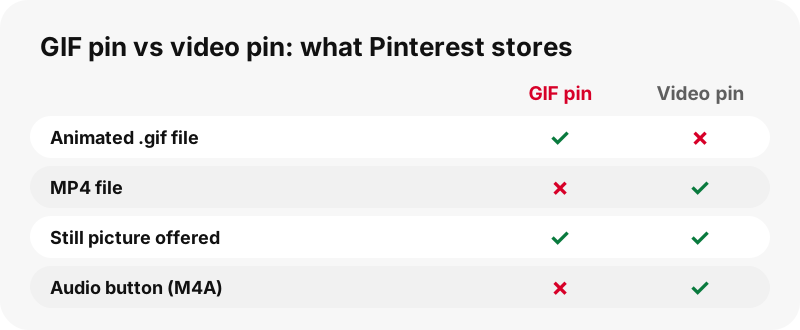
If a loop you liked turns out to be a video, the Pinterest video downloader is the better page for it.
Why does a Pinterest GIF look grainy or banded?
Because of the 256-colour palette, not because of the download. Smooth gradients, skin tones and sunsets need thousands of shades, so a GIF has to approximate them. MDN notes that dithering is generally used to simulate more than 256 colours, which produces the speckled look.
The download cannot improve that, and PinDownload does not try. Running a GIF through an "enhancer" would mean re-encoding it into a new, larger file with guessed detail.
What the download does guarantee is that you lose nothing further. The file is the same one Pinterest stores, frame for frame.
Is the GIF compressed again when I download it?
No. The file streams from Pinterest's server through a signed link and reaches you unchanged. There is no server-side conversion step, so there is nothing that could drop frames, change the timing or shrink the palette.
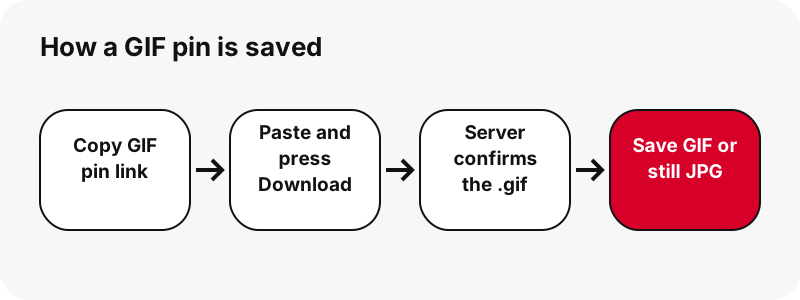
You can check this yourself: the size printed on the button, for example 494 KB for a 396×223 GIF in our test, matches the size of the saved file in your Downloads folder.
Links stay valid for one hour and we do not keep a copy. If you come back to an old card, press Download again. Like every tool on this site, the Pinterest GIF downloader needs no account and reads only public pins.
Can I post a GIF I found on Pinterest?
Sending a funny loop to a friend is very different from reusing an artist's animation in a campaign. Animated illustrations and edits are creative works, and their copyright normally stays with whoever made them.
The U.S. Copyright Office's fair use page explains that some uses, such as comment, criticism or teaching, may qualify as fair use, judged case by case on four factors. Pinterest's copyright policy describes how creators report reposted work.
When in doubt, credit and link the original pin or ask the creator. Our legal guide goes through the common situations in plain words.
Why won't my Pinterest GIF download?
When the Pinterest GIF downloader returns no .gif, the cause is usually the link or the type of pin. Work through this list:
- Open the pin in a private window. If it asks you to log in to see it, the pin is not public.
- Read the card message. "This pin is a video, not a GIF" means the MP4 button is the file you want.
- "This pin has no animated GIF" means the pin is a still picture; the image button is its original.
- If the card is over an hour old, press Download again for fresh links.
- On a slow connection, wait: a 1.49 MB GIF takes longer than a photo.
For other errors, the not working guide lists the remaining causes.
Other tools next to the Pinterest GIF downloader
Need the picture, the clip or the sound instead of the loop? Each card below opens a tool that puts that file first.
Frequently asked questions
Is PinDownload part of Pinterest?
No. It is an independent tool, not affiliated with or endorsed by Pinterest. It reads only public pins.
Is the Pinterest GIF downloader free?
Yes. No payment, no account and no app to install.
Can I download a Pinterest GIF as MP4?
Not from Pinterest's servers: GIF pins have no MP4 copy, so none is offered. You can convert the saved .gif yourself in a video editor.
Does the GIF keep its animation after download?
Yes. The .gif file is delivered byte for byte, with all frames and the same timing.
Why is the downloaded GIF so large?
GIF stores each frame as an indexed picture with old compression. In our tests a 128×128 GIF weighed 1.49 MB.
Why did I get an MP4 instead of a GIF?
The pin you pasted is a video pin. The card says so, and the MP4 is the only animated file Pinterest keeps for it.
Does the GIF have sound?
GIF pins come with no audio button, because only video pins have a sound track to extract.
Can I get just one frame of the GIF?
Yes. The still JPG button gives one frame as a normal picture. On a Mac, Preview also shows every frame separately.
Will a downloaded GIF play on my iPhone?
The file is saved to Files › Downloads, where Quick Look can preview images. We could not confirm from Apple's documentation how Photos plays GIFs, so we do not promise it.
Can I download GIFs from a whole board?
Yes, one by one. The board downloader lists up to 50 pins of a public board, and GIF pins in it get their .gif button.
Is a watermark added to the GIF?
No. Anything drawn on the animation was there in the creator's file.
Can I download a GIF from a private pin?
No. Private pins and secret boards are not public, so they cannot be read by any outside tool.
Guides
Video — Paste a pin link and save the video as MP4, up to 720p.
Sources
- Image file type and format guide — MDN Web Docs (Mozilla)
- GIF — Wikipedia
- View an animated GIF's frames in Preview on Mac — Apple Support
- Where to find downloads on your iPhone or iPad — Apple Support
- Manage photos and videos with Microsoft Photos app — Microsoft Support
- File types & external devices that work on Chromebooks — Google Chromebook Help
- Download a file (Chrome on Android) — Google Chrome Help
- U.S. Copyright Office Fair Use Index — U.S. Copyright Office
- Copyright — Pinterest Policy