What is a Pinterest Reels downloader?
A Pinterest Reels downloader is a tool that turns the link of a short vertical Pinterest video into a file you can keep on your phone or computer. Pinterest itself does not use the word Reels; people borrow it from other apps for the full-screen clips that Pinterest calls idea pins or video Pins.
PinDownload is that kind of tool, built around one promise: before you save anything, you see the real pixel size and the real file size of each copy. No account, no Pinterest login and nothing to install. The tool is free and works in any modern browser.
This page is the idea-pin mode of our Pinterest Reels downloader. The same box also handles classic video pins, images and GIFs, but the explanations below focus on vertical clips, because they are stored differently. If you want any video pin as a plain file, the Pinterest to MP4 page covers the general case.
Idea pins, Story pins, video Pins: are they the same thing?
For downloading, yes: people use all three names for short, vertical, tap-through Pinterest posts. You will see Story pins and idea pins in articles and searches, while Pinterest's current help pages simply talk about video Pins, which can hold one clip or several clips and images.
“Video Pins feature a single video or multiple videos and images in one Pin. You can add effects like text overlay, stickers and more to make them interactive.”
Wikipedia's Pinterest article records that in October 2022 Pinterest added licensed music from major labels to its video-focused idea pins. That is why many of these clips carry a soundtrack, and why the audio button on the result card is useful.
For you, the label does not matter. If the clip plays full screen and swipes like a reel, paste its link here and the tool works out what is inside.
Why are Pinterest Reels harder to download than normal video pins?
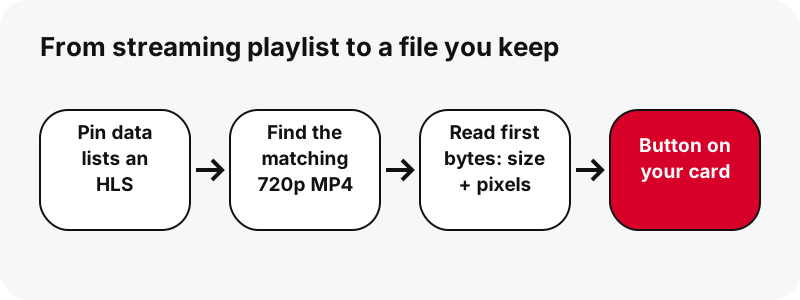
They are harder because, for a Pinterest Reels downloader, the pin data of an idea pin lists only a streaming playlist, not a ready MP4 file. A classic video pin advertises an MP4 next to the stream; an idea pin usually does not, so a tool that only reads the listed files finds nothing to save.
The playlist uses HTTP Live Streaming (HLS), the format that splits a video into many small chunks and lets the player switch quality on the fly.
“A list of available streams, encoded at different bit rates, is sent to the client using an extended M3U playlist.”
A playlist of chunks is not something you can drop into your camera roll. PinDownload reads the playlist name, finds the matching 720p MP4 that Pinterest also keeps on its servers, and opens the first bytes of that file to confirm it exists and to read its true size. Only files that pass that check get a button.
What files does the result card show for an idea pin?
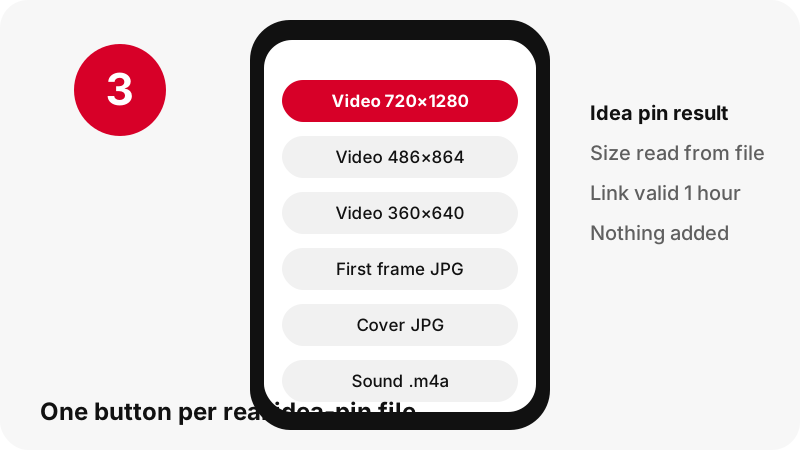
The Pinterest Reels downloader card shows one button per real file, and for a single-page idea pin that usually means five buttons. Each one names the format, the pixel size and the file size, so you can choose before downloading.
| Button | Format | Typical size | Best for |
|---|---|---|---|
| Video, top quality | MP4 (H.264 + AAC) | 720×1280 | Keeping, editing, watching on a big screen |
| Video, medium | MP4 (H.264 + AAC) | about 486×864 | Phones on a limited data plan |
| Video, small | MP4 (H.264 + AAC) | about 360×640 | Quick previews, slow connections |
| First frame | JPG | full size, e.g. 1080×1920 | A still of the opening shot |
| Cover | JPG | as uploaded | The image the creator chose for the feed |
There is also an audio option that copies the sound track into an .m4a file on your own device. It is not an MP3; the Pinterest to MP3 page explains why and how it plays.
Why is 720p the best quality for Pinterest Reels?
720p is the best because it is the largest copy Pinterest keeps for these clips. In our tests on 2026-10-24, an idea pin whose source was listed as 1080×1920 still had 720×1280 as the top entry in its playlist and as its largest MP4. No 1080p file existed to give you.
So when a page promises 1080p, 2K or 4K for a Pinterest reel, ask where that file would come from. Upscaling a 720p clip makes the file bigger, not sharper. We prefer to show the real number on the button and let you decide.
Pinterest also stores HEVC copies of some clips. We do not offer them, because many phones, browsers and older computers cannot play HEVC without extra software, and an MP4 that will not open is worse than a smaller one that will.
The deeper story of resolutions, bit rates and covers sits in Pinterest video quality explained, and the HD video downloader page answers the HD question head-on.
How big is a downloaded Pinterest Reel?
A file from the Pinterest Reels downloader is usually small: a few megabytes for a clip of ten seconds, and about 20 MB for a minute and a half. These are measured numbers from our own tests, not promises; your clip may be lighter or heavier depending on motion and length.
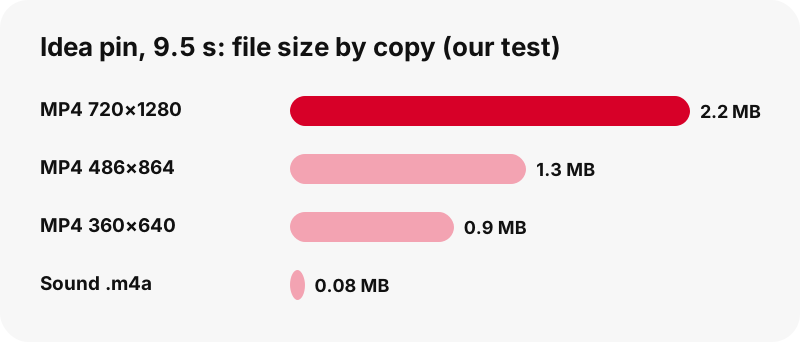
| Pin tested (2026-10-24) | Largest MP4 | Smaller copies | Sound (.m4a) |
|---|---|---|---|
| Idea pin, 9.5 s | 720×1280, 2.2 MB | 486×864 = 1.3 MB · 360×640 = 0.9 MB | 80 KB |
| Idea pin, 90 s (source 1080×1920) | 720×1280, 20.9 MB | listed on the card | ≈ 738 KB |
| Classic video pin, 13 s (for comparison) | 576×1024, 3.3 MB | none | 109 KB |
The medium MP4 of the 9.5-second clip was about 40 % lighter than the top copy, and the small one was about 60 % lighter. On a capped data plan that difference adds up if you save many clips.
Can I download a Pinterest Reel with several pages?
Yes. When an idea pin has several pages, the result card lists each page as its own item, so you save the pages you want instead of one merged clip.
- Picture pages come as the original uploaded image, in the format the creator used (JPG, PNG or WebP).
- Video pages are handled one by one with their own MP4, first frame and cover.
- Carousel pins with several slides list up to 20 slides, each with its own buttons.
One honest note. Most idea pins today have a single page, and during testing we could not find a live idea pin with several video pages. The code handles them page by page, but we have not seen one end to end.
A carousel pin of 13 slides, with 7 video slides at 720×900, was listed in about 1.8 seconds in our tests.
If you only need a picture page, the Pinterest image downloader explains how originals differ from the 736-pixel preview.
Which Pinterest Reels can't be downloaded?
Private pins, pins on secret boards and anything that needs a login cannot be saved by this Pinterest Reels downloader, because PinDownload only reads public pin data and never signs in to Pinterest. If you cannot open the pin in a private browser window, the tool cannot open it either.
- Pins deleted by the creator, or removed by Pinterest, return no files.
- Profile tabs and board sections are not accepted as links; open the single pin first.
- Captions and subtitles are not offered as separate files.
- There is no ZIP of many reels at once; a public board can be listed pin by pin on the board downloader (up to 50 pins).
When something fails, the tool says why in plain words instead of giving a broken file. The longer checklist lives on Pinterest video download not working, and the reasons private content stays private are on download private Pinterest videos.
Where do saved Pinterest Reels go on iPhone and Android?
On iPhone they go to the Downloads folder of the Files app; on Android they go to your browser's default download location, which the Files app shows. Moving a clip into Photos or Gallery is a separate step that depends on your device.
Apple says it plainly in its guide to finding downloads: files downloaded from the internet on iPhone or iPad land in the Downloads folder in Files. Right after a download, the Downloads button next to the Safari search field also lists it.
Google's Chrome help for Android says files are saved to the default download location, and that the Files app shows everything you downloaded. Step-by-step device guides: iPhone, Pinterest Reels on Android and the full map in where do Pinterest downloads go.
Which MP4 size should I pick for a reel?
In the Pinterest Reels downloader, pick 720×1280 unless you have a reason not to: it is the sharpest copy and still small. Choose a lighter copy when data, storage or upload limits matter more than detail.
- Saving a reference clip (a recipe, a hairstyle, a workout): 720×1280, so text overlays stay readable.
- Sending to a friend in a chat app: 486×864 is usually enough on a phone screen.
- Slow or roaming connection: 360×640 first; you can come back for the bigger copy later, while the link is still valid.
- Only the music or voice: the .m4a sound file, which in our 9.5-second test weighed 80 KB.
All three MP4s use H.264 video with AAC sound, the pairing that phones, tablets and computers play without extra apps. Wikipedia's page on Advanced Video Coding describes H.264 as by far the most commonly used format for recording, compressing and distributing video.
Does PinDownload keep a copy of the reels I save?
No. Our Pinterest Reels downloader keeps nothing: files are streamed from Pinterest's servers through a signed download link, and we do not store the videos. Each link expires after one hour, so a link you copy and share later will stop working.
The audio option goes even further: the sound is copied out of the MP4 inside your own browser, and nothing is uploaded to us. The privacy page lists exactly what the server sees.
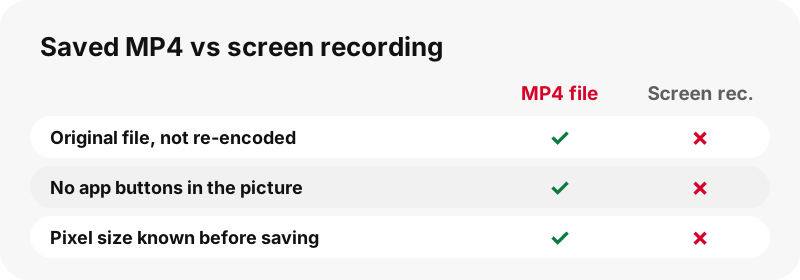
PinDownload adds no watermark, no intro and no logo to any file. What you save is the file Pinterest serves, unchanged.
Is it okay to repost a Pinterest Reel I downloaded?
Usually not without permission: saving a clip for yourself is one thing, posting someone else's video as your own can infringe their copyright. The creator owns the clip, and Pinterest's copyright policy explains how owners can report infringing copies.
Good habits: keep the clip for personal reference, ask the creator before reusing it, and credit them by name and link when they say yes. If you plan to use a reel in your own content, read is it legal to download Pinterest videos first.
More PinDownload tools
Need a different file from the same pin? These tools share the same box and the same honest size labels.
Frequently asked questions
Does Pinterest have Reels?
Not under that name. Pinterest calls its short vertical clips idea pins or video Pins. Reels is the word people bring from other apps, and this page uses it because that is what many people search for.
Can I download Pinterest idea pins with this Pinterest Reels downloader?
Yes. Paste the idea pin link and press Download. The tool finds the 720p MP4 behind the streaming playlist, checks that it exists and shows its real size.
Can I download a Pinterest story?
Yes, if what you call a story is a public pin. A multi-page or vertical video pin is read the same way as any idea pin, and each page is listed separately.
Why can't I get my Pinterest reel in 1080p?
Because Pinterest does not keep a 1080p copy of these clips. In our tests even a 1080×1920 source had 720×1280 as its largest MP4. Any 1080p file would be an upscale, not real detail.
Is there sound in the downloaded reel?
Yes, when the clip has a sound track. The MP4 carries AAC audio. If a clip has no sound track, the audio option says so instead of producing a silent file.
Can I save only the music from an idea pin?
You can save the sound track as an .m4a file, copied byte for byte on your device. It is not converted to MP3. See the Pinterest to MP3 page for details.
Do I need a Pinterest account to download reels?
No. PinDownload never asks for a login and only reads public pins. You only need the pin link.
Does it work with pin.it short links?
Yes. A pin.it link is followed to the pin it points to. If it points to a board, board mode opens instead and lists up to 50 pins.
Can I download all the reels of a profile?
No. Profile pages are not supported. You can list a public board pin by pin, or paste single pin links one at a time.
Why does my download link stop working?
Download links expire after one hour for safety. Paste the pin link again and you get fresh buttons.
Is there a PinDownload app for reels?
There is no APK and no store app. The site works in any modern browser and can be added to your home screen; see the Pinterest downloader app page.
Is PinDownload part of Pinterest?
No. PinDownload is an independent tool with no link to Pinterest, Inc. It only reads pins that anyone can already see in public.
Guides
Video — Paste a pin link and save the video as MP4, up to 720p.
Sources
- Types of Pins on Pinterest — Pinterest Help Center
- Share Pins, boards, and profiles — Pinterest Help Center
- Copyright — Pinterest Policy
- HTTP Live Streaming — Wikipedia
- Pinterest — Wikipedia
- Advanced Video Coding — Wikipedia
- Find your downloads on iPhone or iPad — Apple Support
- Download a file (Chrome on Android) — Google Chrome Help