Can you download private Pinterest videos at all?
No. A private pin is shown only to people logged in with permission, and a download tool that works without your login sees what a stranger sees: nothing. PinDownload reads public pins only, and we say so on every page.
That is why searches to download private Pinterest videos end in disappointment or worse. Pages that claim to do it either fail quietly, or ask for your Pinterest email and password, which is the real risk. Both cases are covered below.
- Public pin: the tool lists the MP4, the cover image and the sound, each with its real size.
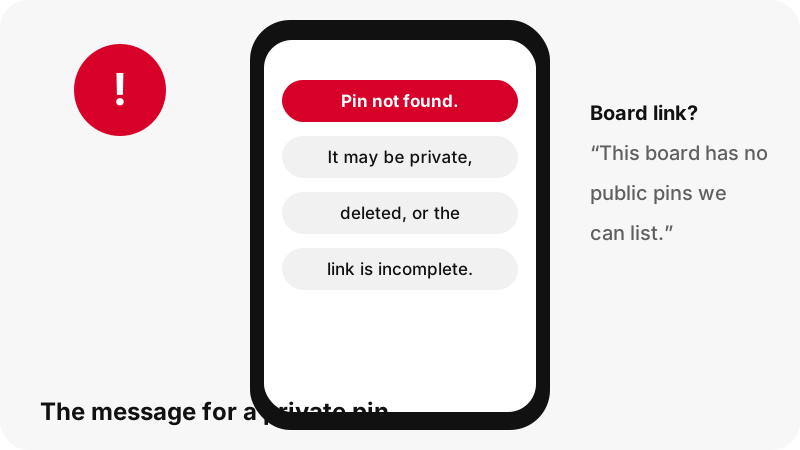
- Pin on a private board: the card says “Pin not found. It may be private, deleted, or the link is incomplete.”
- Private board link: the card says “This board has no public pins we can list.”
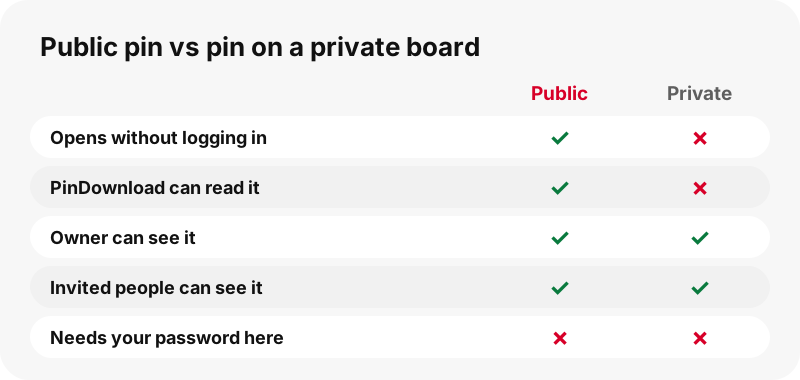
What counts as private on Pinterest?
Pinterest has several privacy settings, and only some of them hide pins. Its help page on private boards puts the main rule in one sentence.
“Only you (and anyone you invite) can see your private boards.”
The help page's address still says secret-boards, but its text now uses the word private. A whole profile can also be private: Pinterest says private profiles won't appear in search results on Pinterest or in search engines, and people need an invitation to follow.
| Setting | What Pinterest says | Can PinDownload read the pin? |
|---|---|---|
| Private board | Only the owner and invited people can see it | No |
| Private profile | Hidden from Pinterest search and search engines; followers by invitation | No |
| Protected board (business tools) | Only reachable with a direct link; its pins may still surface in search and feeds | Only if the pin itself opens for a guest |
| Search privacy | Asks search engines not to list the profile and boards | Yes, if the pin is still public on Pinterest |
| Public pin | Visible to anyone | Yes |
Why can't any tool get around it?
Because the lock sits on Pinterest's servers, not in the pin link. When a pin is private, Pinterest simply does not send its data to a visitor without the right account. There is no hidden file address to guess and no trick in the URL.
The only way in would be to log in as someone with access, and Pinterest's Terms of Service are explicit about the alternative. Users agree not to scrape or copy content in unauthorized ways, or to:
“access or attempt to access data you do not have permission to access.”
So a service that promises to download private Pinterest videos is asking you, or itself, to do exactly that. We built PinDownload the other way round: no login form, no cookies from your Pinterest session, and only data that Pinterest serves to the public.
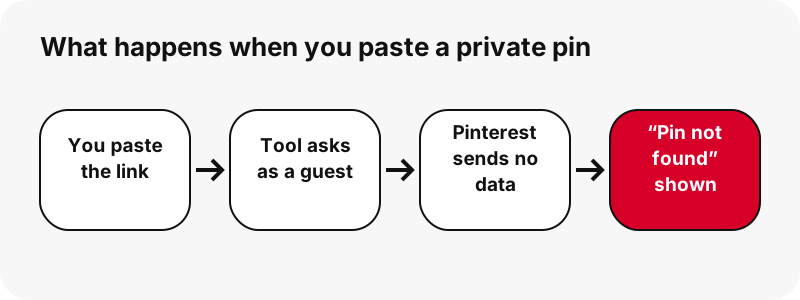
Why is a login request a red flag?
Because handing a third-party site your Pinterest password gives it your whole account, not one video. Pinterest's own account security advice is blunt about where that password belongs.
“Keep your password secret—we'll never ask for your password by email, instant message or phone”
The same page tells users to enter their password only on pinterest.com or in Pinterest's app, to check that the address bar ends in pinterest.com, and to install browser add-ons only from publishers they trust. A “private pin downloader” extension that wants your login fails every one of those tests.
- Asked for your Pinterest email and password: close the page.
- Asked to install an extension to “unlock” private pins: do not install it.
- Already typed your password somewhere odd: change it on pinterest.com and turn on two-factor authentication, which the same Pinterest page recommends.
What does PinDownload show for a private pin?
A plain message, never a broken or fake file. The tool asks Pinterest for the pin's public data; if none comes back, it tells you so and stops. Each message means something specific.
| Message on the card | Most likely reason | What to do |
|---|---|---|
| Pin not found. It may be private, deleted, or the link is incomplete. | Private board, private profile, deleted pin or a cut link | Copy the link again; if it still fails, the pin is not public |
| This board has no public pins we can list. | Private board, or a board with no public pins | Ask the owner to share the pins or make the board public |
| That is not a Pinterest pin link. Use a link like pinterest.com/pin/123… or pin.it/… | A profile, search page or another site was pasted | Open the pin itself and copy its link |
| Pinterest did not answer. Try again in a moment. | Temporary problem on Pinterest's side | Wait a moment and try again |
If you get buttons with sizes, the pin is public and saving works as usual, as in the iPhone guide or the Android guide.
How can you tell if a pin is public before you try?
Open the link where you are not logged in to Pinterest. If the pin and its video appear for a guest, the tool can read it too; if Pinterest asks you to log in or shows an error, it is not public.
- Copy the pin link while logged in, as usual.
- Open it in a browser or device where you are logged out of Pinterest.
- If the video plays there, paste the link into PinDownload and press Download.
- If it does not, the pin is private, deleted, or the link is wrong.
Pins you saved to your own private board are a common surprise. The original pin may still be public on the creator's own board; if you can find it there, copy that link instead.
What if the private video is your own?
Then you are the one person who can open it, and two honest routes exist. The simplest: you uploaded the video, so the original file is probably still on the device or drive you uploaded it from, at its full upload quality.
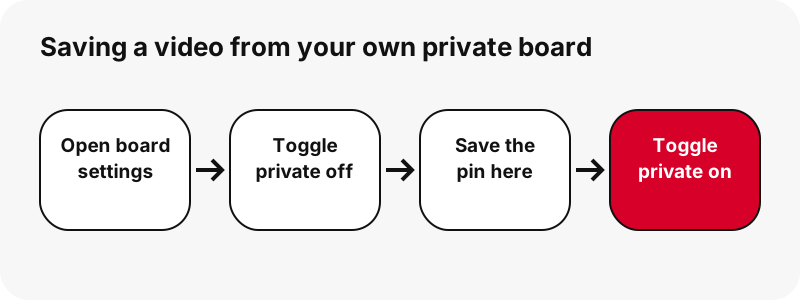
The second route uses Pinterest's own setting. Its private boards page says that to make a private board public you toggle off Make this board private in the board settings. Save the pins you need while it is public, then switch the toggle back.
While the board is public, anyone can see it. Teen profiles from 13 to 16 are private by default and cannot be made public, according to Pinterest's profile privacy page.
For a full board of your own pins, the board downloader lists up to 50 pins of a public board and prepares them one by one.
What if the video belongs to someone else?
Ask them. A creator who keeps a board private has made a choice, and a short message asking for the clip, or for a public link, respects it. Many creators will simply send the file, which is better than any download.
Ownership matters even for public pins. Pinterest's copyright policy explains how rights holders report infringement under the DMCA, and the U.S. Copyright Office notes that fair use is judged case by case, with no fixed amount that is always safe.
Keeping a public clip for personal viewing is one thing; reposting someone else's video is another and can infringe copyright. Our page is it legal to download Pinterest videos walks through the difference.
Can Pinterest's own download button save private pins?
Pinterest offers its own download option for some pins, and its download help page is careful to say that not all Pins can be downloaded. That page describes downloading image pins from the pin menu; it does not promise anything for private content seen by other people.
Inside your own account, Pinterest shows you your private boards and lets you change their settings. Outside the account, from a website like ours, private pins stay private. We think that is the right design.
Are deleted Pinterest videos recoverable?
Not through us. When a pin is deleted, Pinterest stops serving it, and PinDownload keeps no copies: files are streamed from Pinterest's servers through a link that expires after one hour, and nothing is stored on our side.
If you saved the MP4 earlier, look in your download folder; the download folder for every device lists where each phone and computer puts files. If you never saved it, only the creator still has the original.
What you can download from Pinterest instead
Any pin that opens for a logged-out visitor. For those, the tool shows the real pixel size and file size of each file before you save it, adds no watermark and needs no account.
- Videos and idea pins as MP4, up to 720p: idea pin downloader
- Pictures in their original upload size: Pinterest image downloader
- The sound as M4A (not MP3): Pinterest to MP3
- Pins that fail for other reasons: download not working
Frequently asked questions
Can I download private Pinterest videos with a link?
No. A link to a private pin opens only for the owner and invited people; for everyone else, including our tool, Pinterest returns no video.
Why does PinDownload say “Pin not found”?
The pin is private, deleted, or the link was copied only partly. Copy it again from the share icon; if the message stays, the pin is not public.
Are secret boards the same as private boards?
Yes in practice: Pinterest's current help calls them private boards, visible only to the owner and anyone they invite.
Can I download from a private board if I am invited?
Not with PinDownload, because it never logs in as you. Inside Pinterest you can see the pins; ask the board owner for the files.
Is there a private Pinterest video downloader that works?
Not without someone's login. Pinterest's Terms forbid accessing data you do not have permission to access, and handing your password to a third party puts your account at risk.
Is it safe to log in to Pinterest through a downloader site?
No. Pinterest says to enter your password only on pinterest.com or in its app, and that it never asks for your password by email, message or phone.
How do I save a video from my own private board?
Use your original file, or toggle off Make this board private in the board settings, save the pin here, then switch the board back to private.
Can I download pins from a private Pinterest profile?
No. Pinterest hides private profiles from its search and from search engines, and PinDownload reads only what a logged-out visitor can open, so those pins stay out of reach.
Does search privacy make my pins private?
Pinterest describes search privacy as a setting for search engines. Whether our tool can read a pin depends only on whether it opens for a logged-out visitor.
Can I recover a deleted Pinterest video?
Not through PinDownload. We store no files; once a pin is deleted, only a copy you saved earlier or the creator's original remains.
Will PinDownload ever ask for my Pinterest password?
Never. The tool has no login form and reads only the data Pinterest shows to the public.
Is PinDownload part of Pinterest?
No. PinDownload is independent from Pinterest and not affiliated with it in any way, which is exactly why it can only see public pins.
Guides
Video — Paste a pin link and save the video as MP4, up to 720p.
Sources
- Private boards — Pinterest
- Make your profile private or public — Pinterest
- Update your search privacy — Pinterest
- Protected boards — Pinterest
- Protect your account — Pinterest
- Terms of Service — Pinterest
- Copyright — Pinterest
- U.S. Copyright Office Fair Use Index — U.S. Copyright Office
- Download an image — Pinterest