How to use the Pinterest video downloader
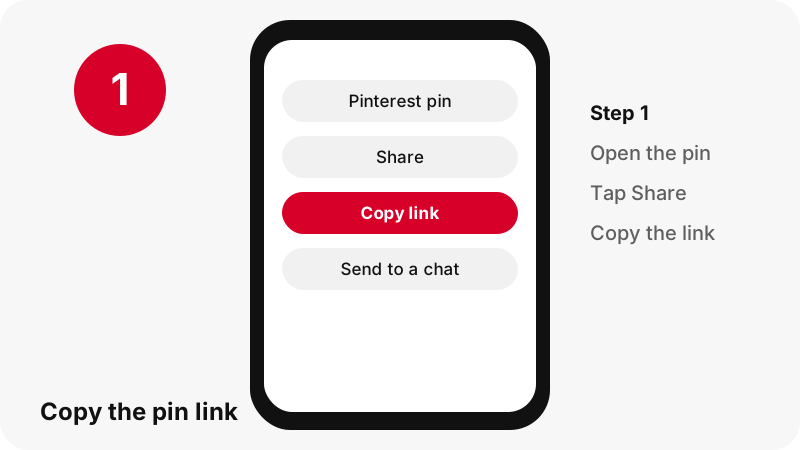
- Copy the link. Open the pin in the Pinterest app or a browser and copy its link, or a pin.it short link.
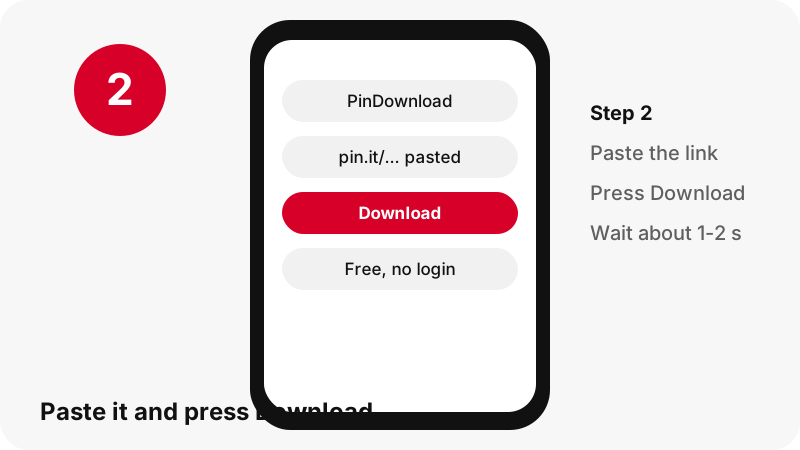
- Paste it. Paste the link into the box above, or tap Paste.
- Press Download. Press Download. For a board link the tool lists its pins.
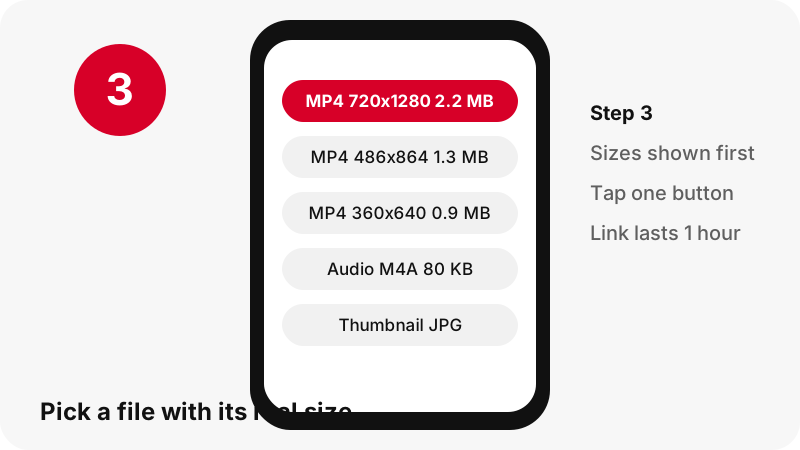
- Pick a button. Each button shows the pixel size and file size. Tap the file you want; the link works for one hour.
What does this Pinterest video downloader do?
PinDownload is a free, online Pinterest video downloader: you paste the link of a public pin and get the real files behind it, as MP4, JPG, PNG, WebP or GIF. Before anything downloads, every button shows the true pixel size and file size, read from the file itself.
It is a full Pinterest downloader too, not only for video: images, GIFs, thumbnails, carousels and boards go through the same box.
There is no account to create, no Pinterest login and nothing to install. The page runs in the browser you already use, on a phone, a tablet or a computer. We do not add a watermark, and there are no ads on the site at launch.
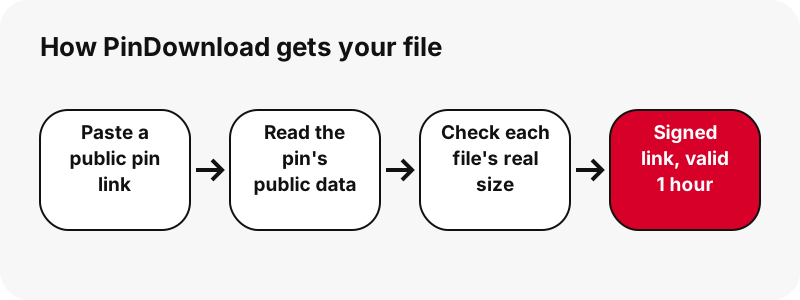
Behind the button, the work is simple to describe. The server reads the pin's public data, finds every file Pinterest lists for it, opens the first bytes of each file to confirm what it really is, and then hands you a signed download link that stops working after one hour.
- Video pins and idea pins become an MP4 with sound, up to 720p.
- Image pins give the original upload, not the small preview.
- GIF pins give the animated
.gifplus a still picture. - Any video can also give its sound track as an .m4a file.
Which Pinterest links can you paste?
You can paste three kinds of link: a pin page, a pin.it short link, or a public board. Any Pinterest country domain works, so a pin opened on a .fr, .de or .co.uk address is handled the same way as one on pinterest.com.
Links the downloader accepts
| Link you paste | Example shape | What happens |
|---|---|---|
| Pin page | pinterest.com/pin/1234567890/ | The pin is read and every file is listed |
| Pin page with a title in the address | pinterest.com/pin/title-words--1234567890/ | Same as above; the number is what counts |
| Country domain | pinterest.fr/pin/1234567890/ | Same as pinterest.com |
| Short link | pin.it/AbCdE | Followed to the pin, or to the board it points to |
| Public board | pinterest.com/user/board-name/ | Board mode: up to 50 pins listed |
Links it refuses, and why
Profile pages, profile tabs and board sections are not supported, and the tool says so with a clear message instead of failing silently. Private pins and secret boards cannot be read, because their data is not public. For the details on short links, see the Pinterest link downloader page.
What files do you get for each type of pin?
You get one button per real file, and the list depends on the pin type. A classic video pin, an idea pin, an image, a GIF and a carousel are stored differently by Pinterest, so the result card adapts to what the pin actually contains.
| Pin type | Files offered | Example from our tests |
|---|---|---|
| Classic video pin | MP4 (H.264 video + AAC sound), first-frame image, cover image | MP4 576×1024, 3.3 MB (13 s clip) |
| Idea pin (short vertical video) | MP4 720p, plus smaller 486×864 and 360×640 MP4s, thumbnail, cover | MP4 720×1280, 2.2 MB (9.5 s clip) |
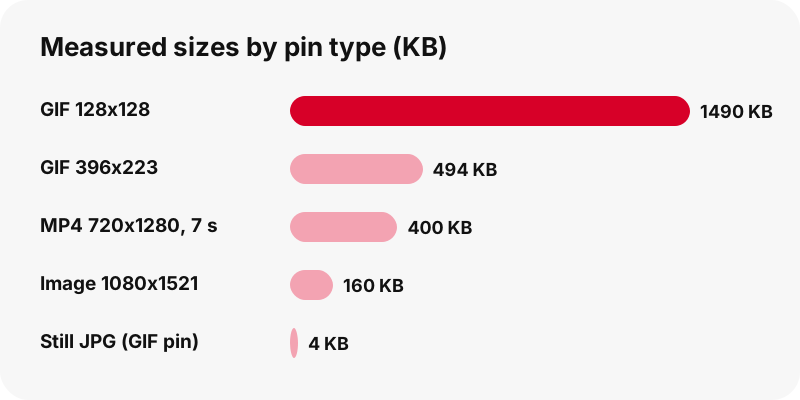
| Image pin | Original upload (JPG, PNG or WebP as uploaded) | Original 1080×1521, 160 KB |
| GIF pin | Animated .gif + still JPG | 396×223 GIF, 494 KB |
| Carousel pin | One item per slide, up to 20 slides | 13 slides listed in about 1.8 s |
| Any video | Sound track as .m4a (not MP3) | 80 KB for a 9.5 s idea pin |
The Pinterest video downloader handles all of them from one box, and each type has its own page with more detail: the image downloader, the GIF downloader, the idea pin and Reels-style downloader and the thumbnail downloader.
How do you download a Pinterest video in three steps?
To download a Pinterest video with this Pinterest video downloader, copy the pin's link, paste it into the box at the top of this page and press Download. The result card then shows each file with its size, and you tap the one you want.
Step 1: copy the link
In the Pinterest app, open the pin, tap the share icon and choose the option that copies the link. In a browser, the address bar already holds the pin link. A pin.it short link works just as well as the long one.
Step 2: paste and press Download
Tap Paste or long-press the box, then press Download. In our tests a single pin was read in about 1.1 to 1.5 seconds on a local run; speed on your side depends on your connection.
Step 3: pick a button
Choose the size that suits you. On mobile data, the smaller idea pin copies save space; on Wi-Fi, take the largest MP4. The file comes straight from Pinterest's servers through our temporary link.
Why is the best quality 720p?
The best quality is 720p because that is the largest MP4 Pinterest serves for a video pin, and an honest Pinterest video downloader cannot go above the source.
For idea pins, Pinterest's public data lists a streaming playlist. In our tests, even a clip whose source was listed as 1080×1920 had 720×1280 as its largest playlist entry and largest MP4.
The playlist uses HTTP Live Streaming (HLS), a method that splits a video into small pieces at several quality levels. PinDownload finds the matching 720p MP4 file, checks that it exists, and offers it, plus two smaller copies from the same ladder.
What about 1080p and 4K?
No 1080p or 4K MP4 exists for the pins we tested, so we do not offer one and we do not label a 720p file as HD 4K. A tool cannot add detail that was never in the file. If a page promises a 4K Pinterest download, ask where that file would come from.
Why are some copies not offered?
Pinterest also keeps HEVC copies on its servers. We leave them out because many phones, browsers and older computers cannot play HEVC, and a file that will not open is worse than a slightly larger one that will. The Pinterest video downloader HD page and the quality explained guide go deeper.
How large are the files you download?
File sizes in our tests ranged from 0.4 MB for a 7-second clip to 20.9 MB for a 90-second idea pin. Length matters more than anything else, which is why the result card prints the exact size on every button before you tap.
| Pin | File | Size |
|---|---|---|
| Idea pin, 9.5 s | MP4 720×1280 / 486×864 / 360×640 | 2.2 MB / 1.3 MB / 0.9 MB |
| Idea pin, 90 s | MP4 720×1280 | 20.9 MB |
| Classic video pin, 13 s | MP4 576×1024 | 3.3 MB |
| Classic video pin, 7 s | MP4 720×1280 | 0.4 MB |
| Image pin | Original 1080×1521 | 160 KB |
| GIF pin | Animated 128×128 | 1.49 MB |
| Idea pin, 90 s | Sound only (.m4a) | about 738 KB |
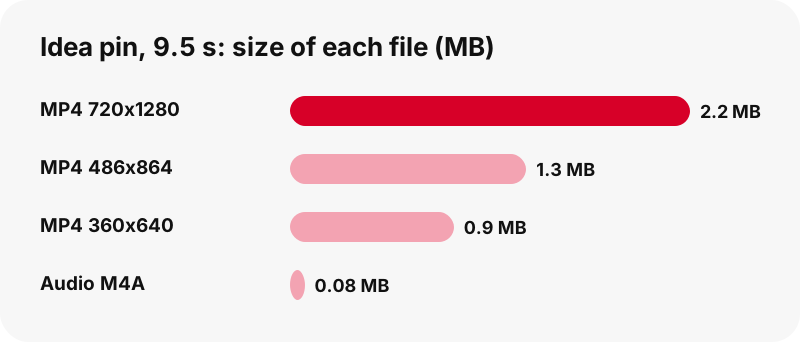
Two numbers often surprise people. A tiny animated GIF can weigh more than a short MP4, because GIF is an old, inefficient format. And the sound track of a video is small: about 80 KB for a 9.5-second idea pin.
Where do Pinterest videos go on iPhone and iPad?
On iPhone and iPad, the Pinterest video downloader works in Safari, and a file you download from the internet lands in the Downloads folder of the Files app. Apple says so in its own help article: find downloads on iPhone or iPad.
iPhone
In Safari, right after the download, the Downloads button next to the search field lists the file. Open it from there, or later from Files › Browse › Downloads. Our iPhone guide walks through each screen and what to do next with the MP4.
iPad
The iPad follows the same rule, with Downloads shown in the Files sidebar. The iPad guide covers the larger layout. For pictures and GIFs on Apple devices, see images on iPhone and GIFs on iPad.
Where do downloads go on Android, Samsung and Xiaomi?
On Android, Chrome saves a download to the phone's default download location, and Google's help points you to the Files app to find it. You can also open the list in Chrome from More › Downloads, as explained in Chrome's download help for Android.
Samsung Galaxy
On Galaxy phones, Samsung says downloaded files are typically saved in the My Files app, in the Downloads folder. Our Samsung page lists the exact steps.
Xiaomi, Redmi and POCO
Xiaomi's support page lists browser downloads under File Manager › Download. See the Xiaomi page.
Want the clip in your gallery app? The save to gallery guide explains it, and the Android guide covers the full path.
How do you download Pinterest videos on a computer?
On a computer, you download Pinterest videos exactly as on a phone: paste the link, press Download, click a button. The browser then saves the MP4 to its download folder, which you can check or change in its settings.
Windows PC
Your browser saves the MP4 to the folder set in its download settings, and opens a downloads list when the file is done. Using the Pinterest video downloader on Windows needs no codec pack or player add-on. Our PC guide and Windows page cover the details.
Mac
On a Mac the file goes to the folder your browser is set to use, and you can open it from the browser's downloads list. The Mac guide shows how to play it and where to find it.
Chromebook and Linux
On a Chromebook or a Linux computer the process is the same in Chrome or any other modern browser. Each system has its own folder rules, covered in the Chromebook guide and the Linux page. Move files you want to keep out of temporary folders.
Which device guide should you read?
The Pinterest video downloader is the same everywhere, so read the guide for the device and browser you use, because the save folder changes from one system to another. The table sums up where a downloaded file normally appears and links to the page that explains it step by step.
| Device | Where to look first | Full guide |
|---|---|---|
| iPhone | Files › Downloads (or Safari's Downloads button) | iPhone guide |
| iPad | Files › Browse › Downloads | iPad guide |
| Android (Chrome) | Chrome › More › Downloads, or the Files app | Android guide |
| Samsung Galaxy | My Files › Downloads | Samsung page |
| Xiaomi | File Manager › Download | Xiaomi page |
| Windows | Your browser's download folder | PC guide |
| Mac | Your browser's download folder | Mac guide |
| Chromebook | Files app, Downloads | Chromebook guide |
Every device and format in one place: the all devices hub, the where downloads go hub and the formats hub.
Doesn't Pinterest already have a download button?
Pinterest has a Download image option in a pin's menu, but its help page describes it for images and warns that it does not cover every pin. Here is the line from Pinterest's help article on downloading an image:
“Please note that not all Pins can be downloaded so these steps may not apply to all Pins.”
PinDownload is a Pinterest video downloader that fills the gap for public video pins, idea pins, GIFs and carousels, and for image pins it fetches the original upload. It also tells you the size of each file before you commit, which a menu button does not.
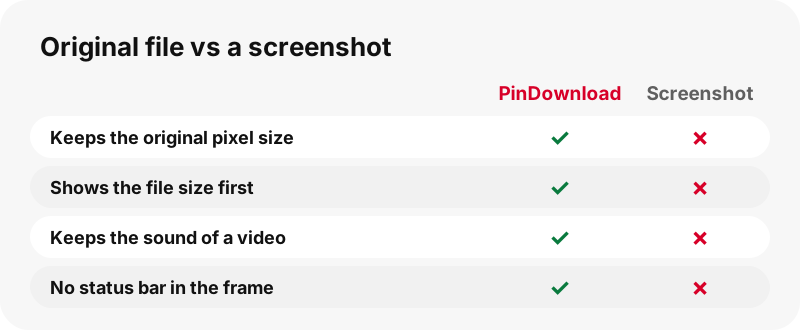
A screenshot or screen recording is the other common workaround. It loses the original resolution, captures the status bar, and a screenshot of a video keeps no sound at all.
Is saving a pin the same as downloading it?
No. In Pinterest's own words, saving a pin adds it to one of your boards, while downloading puts a copy of the file on your device. A saved pin can disappear if the creator deletes it; a downloaded file stays where you put it.
That is the idea behind a Pinterest saver: keeping a personal copy of a recipe clip, a workout or a craft tutorial so you can watch it offline, on a plane or without opening the app. If you mainly save from links shared in chats, the link downloader page is the better start.
When a board is better than a download
If you only want to find a pin again later, saving it to a board is enough and keeps the creator's page in the loop. Download when you need the file itself, for offline viewing or for your own private reference.
Can you get only the sound of a Pinterest video?
Yes. Choose the audio button and your own device copies the AAC sound track out of the MP4 into an .m4a file, byte for byte. Nothing is re-encoded and nothing is uploaded, so the sound is exactly what was in the video.
It is an M4A, not an MP3, and we say so on the button. Audio-only MP4 files are named .m4a by convention; as the MP4 file format article puts it, they “generally have a .m4a” extension. Most modern players open them.
- Before the click, the card shows an estimated size, such as “≈ 76 KB”.
- If the video has no sound track, the tool tells you instead of giving a silent file.
- In our tests the file played in Microsoft Edge with the correct duration.
More on the Pinterest to MP3 (M4A) page, and if a clip seems silent, read Pinterest video with no sound.
What about GIFs, images, thumbnails and carousels?
They all work from the same box of the Pinterest video downloader: paste any public pin and the card lists what is inside. You do not need to pick the right page first; if you do pick one, the tool explains a mismatch instead of hiding it.
Images
For an image pin you get the original upload, not the 736-pixel preview. In one test the pin was listed at 736 px wide while the original was 1365×1706. Format stays as uploaded.
GIFs
A GIF pin gives the animated file plus a still JPG. Pinterest serves no MP4 copy of GIF pins, so we do not offer a GIF to MP4 option. The Pinterest to MP4 page covers video pins.
Thumbnails and covers
Video pins also give the first-frame image at full size, for example 1080×1920, and the cover image, both as JPG.
Carousels
Each slide gets its own item, up to 20 slides. Video slides come with MP4, thumbnail and cover; picture slides with the original image.
Can you download a whole Pinterest board?
You can list up to 50 pins of a public board and save them one by one. Paste the board link, press List pins, and each pin appears with a thumbnail and its own Get button; Get all, one by one prepares them in sequence.
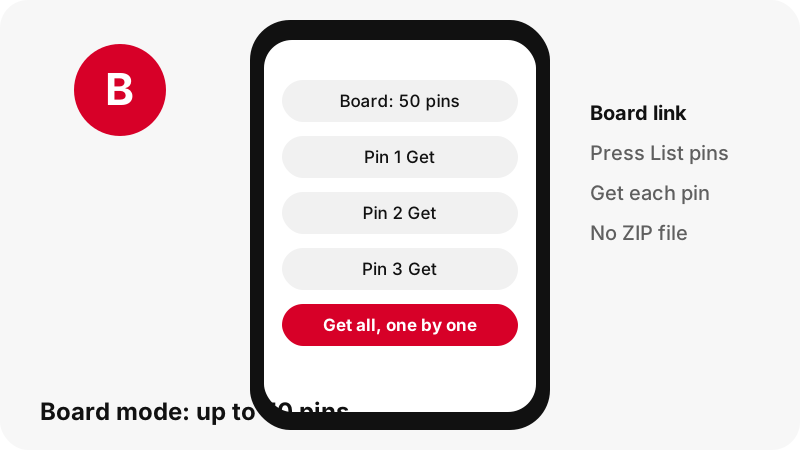
There is no ZIP of the whole board, and boards larger than 50 pins show only the first 50. Secret and private boards cannot be read. Each pin is then handled exactly like a single pin, with its real sizes. The Pinterest board downloader page has the full walkthrough.
Is there a PinDownload app or APK?
No. There is no APK, no store app, no browser extension and no desktop program, and we will not pretend otherwise. PinDownload is a web page that works in any modern browser, so it runs on iPhone, Android, Windows, Mac, ChromeOS and Linux without installing anything.
Any APK or extension that uses the PinDownload name does not come from us, so we cannot vouch for what it does. A bookmark to this page gives you the same Pinterest video downloader with nothing to install and nothing to update.
The Pinterest downloader app page explains how to keep the site one tap away on your home screen.
Is PinDownload safe and private?
PinDownload asks for nothing but a public link. You never type a Pinterest password, there is no sign-up form, and we do not store the files: they are streamed from Pinterest's servers through a signed link that expires after one hour.
- No account, no login, no email address.
- No files kept on our side; links expire after 1 hour.
- Audio extraction runs on your own device.
- No ads at launch, so no pop-ups or fake download buttons.
PinDownload is independent and is not affiliated with, endorsed or sponsored by Pinterest, Inc. Read the privacy policy and the terms for the details, or contact us with a question.
Is it legal to download Pinterest videos?
Downloading a public pin for your own private viewing is how most people use a tool like this, but the video still belongs to its creator. Pinterest's Terms of Service say people who post keep their rights, and its copyright policy is clear on respect:
“Pinterest respects the intellectual property rights of others and we expect people on Pinterest to do the same.”
Reposting someone else's video, using it in an ad or selling it can infringe copyright. In the US, the Copyright Office explains that fair use is judged case by case, so there is no safe percentage. When in doubt, ask the creator and credit them.
Our is it legal guide covers this in plain language, and rights holders can use our DMCA page.
What to do when a Pinterest video download does not work?
When the Pinterest video downloader returns an error, most failures come from the link, not the video. Check that you copied a pin, a pin.it link or a public board, not a profile or a search page, and that the pin is still online and public.
- Open the link in a browser: if Pinterest shows an error, the pin was removed or made private.
- Copy the link again from the share menu; partial links are a common cause.
- Press Download again if more than an hour has passed, because signed links expire.
- On iPhone, check Files › Downloads before downloading twice.
- If the MP4 plays without sound, check whether the original pin had any.
The not working guide lists each error message and its fix. For locked content, the private pins page explains honestly why they cannot be downloaded.
Does the downloaded video have a watermark?
PinDownload adds no watermark, logo or text of its own: you receive the same MP4 that Pinterest serves. If the creator burned a name or logo into the video itself, it is part of the picture and stays there, and removing it would not be fair to the creator anyway.
The Pinterest video downloader without watermark page explains the difference between an added watermark and a creator's own mark.
What can PinDownload not do?
Stating the limits of a Pinterest video downloader up front saves you time. This list is what the tool does not do today, checked against its code on 2026-10-24.
- No private pins, secret boards or anything behind a Pinterest login.
- No 1080p, 2K or 4K: 720p is the top for the pins we tested.
- No MP3 encoding: audio comes as .m4a.
- No GIF to MP4 conversion: Pinterest serves no MP4 for GIF pins.
- No ZIP of a board, no more than 50 pins per board, no profile download.
- No captions or subtitles download.
- No app, APK or browser extension.
If you need something on this list, a different approach (asking the creator for the file) is usually the honest route.
Explore every PinDownload tool and guide
Every tool page runs the same Pinterest video downloader with a preset suited to one need. Pick the one closest to what you want to save:
Guides by device: iPhone, Android, PC, Mac, iPad, Chromebook, Chrome, Safari.
By format: images on Android, GIFs on iPhone, Reels-style pins on Android, audio on iPhone, images on PC, GIFs on Mac.
Learn more about PinDownload, the Pinterest downloader behind these pages, and how each guide is tested against the tool.
Save any kind of pin
Formats and quality
Ways to use it
Frequently asked questions
Is PinDownload free?
Yes. The Pinterest video downloader is free to use, with no account, no trial and no paid tier.
Do I need a Pinterest account?
No. You only paste a public link. We never ask for your Pinterest login.
Is PinDownload part of Pinterest?
No. PinDownload is an independent tool and is not affiliated with Pinterest. It only reads public pins.
What is the highest quality I can get?
720p for video pins and idea pins in our tests. No 1080p or 4K MP4 existed for the pins we checked, so we do not offer one.
Why does the tool show the file size first?
So you know what you are getting before using data or storage. Sizes are read from the files, not guessed.
Can I download a pin.it link?
Yes. Short links are followed to the pin, and a pin.it link that points to a board opens board mode.
Can I download private Pinterest videos?
No. Private pins and secret boards are not public, so the tool cannot read them. See private pins.
Does it work on iPhone?
Yes, in Safari or any other browser. Files land in Files › Downloads. Our iPhone guide has the steps.
Does it work on Android?
Yes. In Chrome, look in More › Downloads or the Files app. See the Android guide.
Does it work on a PC or Mac?
Yes, in any modern browser. The MP4 goes to your browser's download folder.
What format are the videos?
MP4 with H.264 video and AAC sound, which plays on nearly every phone and computer.
Can I convert a Pinterest video to MP3?
Not to MP3. You can save the sound as an .m4a file, copied without re-encoding. See Pinterest to MP3.
Why is the audio an .m4a and not an MP3?
Pinterest videos carry AAC sound. Copying it into .m4a keeps the exact quality; turning it into MP3 would mean re-encoding.
Can I download Pinterest GIFs?
Yes, as the original animated .gif plus a still JPG. Pinterest serves no MP4 copy of GIF pins.
Can I download Pinterest images in full size?
Yes. You get the original upload rather than the 736-pixel preview. See the image downloader.
Can I download idea pins?
Yes. Idea pins give a 720p MP4 plus two smaller copies for mobile data. See the Reels-style downloader.
Can I download a whole board?
You can list up to 50 pins of a public board and save them one by one. There is no ZIP.
Does PinDownload add a watermark?
No. The file is the one Pinterest serves, with nothing added by us.
Is there a PinDownload app or APK?
No. It is a web page that works in your browser on any device, with nothing to install.
Is it safe?
You share only a public link, we store no files, and download links expire after one hour. There are no ads at launch.
Do you keep the videos I download?
No. Files are streamed from Pinterest's servers through a temporary link; nothing is stored on our side.
How long does a download link last?
One hour. After that, paste the pin again to get a fresh link.
Why did my download fail?
Usually the link is not a pin, the pin was removed, or the link expired. See not working.
Why does my video have no sound?
Some pins were uploaded without sound. The tool tells you when a video has no audio track. See no sound.
Can I download carousel pins?
Yes. Each slide is listed separately, up to 20 slides.
Can I download a pin's thumbnail?
Yes. Video pins give the first-frame image and the cover as JPG. See the thumbnail downloader.
Is it legal to download Pinterest videos?
Personal use is the common case, but the creator keeps the rights. Do not repost without permission. Read is it legal.
Which Pinterest domains work?
Any Pinterest country domain, such as .com, .fr, .de or .co.uk, as long as the link points to a pin or a public board.
Where do downloads go?
To your browser's download folder. Our where downloads go hub lists each device.
Sources
- Download an image — Pinterest Help Center
- Copyright — Pinterest Policy
- Terms of Service — Pinterest Policy
- Fair Use Index: About Fair Use — U.S. Copyright Office
- MP4 file format — Wikipedia
- HTTP Live Streaming — Wikipedia
- Find downloads on your iPhone or iPad — Apple Support
- Download a file (Chrome on Android) — Google Chrome Help
- Where to find my downloaded files on my Samsung phone — Samsung
- File storage locations on Xiaomi phones — Xiaomi