What is a Pinterest saver?
A Pinterest saver is a tool that stores a pin's actual file on your phone or computer, rather than bookmarking it inside Pinterest. You get a video, picture or GIF you can open offline, move to another folder or keep after you close the app.
PinDownload is a free Pinterest saver that runs in the browser. You paste one link, it lists every real file in that pin, and each button shows the pixel size and the file size before anything downloads. There is no account, no Pinterest login and nothing to install.
Saving a pin vs downloading a pin: what is the difference?
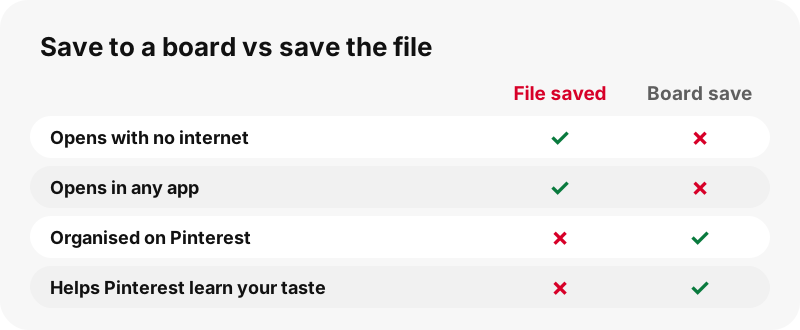
Saving a pin in Pinterest puts it on one of your boards; downloading puts the file on your device. Pinterest's help center draws the same line in its article on downloading images.
“Saving a Pin adds the Pin to one of your boards. This makes it easier to find it later and it helps Pinterest to better understand your taste.”
A board save lives in your Pinterest account and depends on the pin staying online. A downloaded file is yours to open in any app. People usually want both: the board for inspiration, the file for a recipe in the kitchen, a workout at the gym or a reference on a flight.
Can't Pinterest already save pins to my phone?
Sometimes. Pinterest offers a Download option in the menu of some pins, but not all. Its own help page says plainly that not every pin can be downloaded, and for full-screen videos the creator decides.
The Download an image article notes that not all Pins can be downloaded. The creator help page adds that creators choose whether their full-screen (9:16) video Pins can be downloaded, and that a downloaded copy shows a watermark of their username at the bottom.
A browser-based tool fills the gaps: it lists the files of any public pin, shows the size first and adds nothing to them. The watermark question is covered in depth on Pinterest video downloader without watermark.
What can I save with this Pinterest saver?
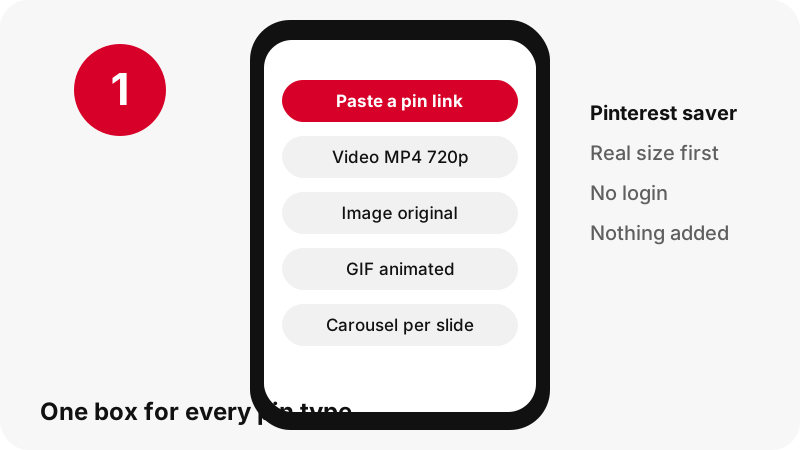
You can save every common pin type from one box. The tool detects the type from the pin itself, so you do not need to pick a mode first.
| Pin type | What you can save | Format |
|---|---|---|
| Video pin | The 720p MP4, the first frame and the cover | MP4 (H.264 + AAC), JPG |
| Idea pin (full-screen clip) | 720p MP4 plus two lighter MP4s, first frame, cover | MP4, JPG |
| Image pin | The original upload, not the 736-pixel preview | JPG, PNG or WebP, as uploaded |
| GIF pin | The original animated file plus a still | GIF, JPG |
| Carousel pin | Each slide, up to 20 | MP4 or original image per slide |
| Sound of a video | The sound track, copied in your browser | .m4a (not MP3) |
Dedicated pages explain each type: videos as MP4, images, GIFs, idea pins and sound.
How do I save a Pinterest video?
Copy the video pin's link, paste it above, press Download and tap the MP4 button. The button already shows the clip's size, so you know what you are saving.
In our tests on 2026-10-24, a 7-second video pin saved as a 0.4 MB MP4 at 720×1280, and a 13-second one as 3.3 MB at 576×1024. For idea pins you also get lighter copies of about 486×864 and 360×640, handy on a data plan.
As a Pinterest video saver, the tool never upscales: 720p is the top for these clips, so a button will never say 1080p or 4K. Why that is the ceiling is explained on Pinterest video quality explained.
How do I save Pinterest images in full size?
Paste the image pin's link and choose the original. The tool fetches the uploaded original instead of the 736-pixel-wide preview the feed shows.
In one of our tests an image listed as 736 pixels wide had an original of 1365×1706. Another image pin gave an original of 1080×1521 at 160 KB. The format stays as uploaded, so a PNG remains a PNG with its transparency.
Want the cover image of a video instead? The thumbnail downloader lists the first frame and the cover as full-size JPGs.
How much space do saved pins take?
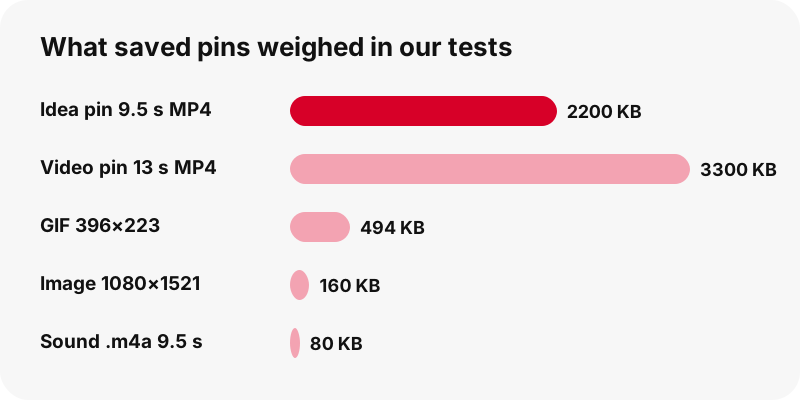
Less than most people expect: a short clip is a few megabytes and an image is a few hundred kilobytes. These are measured examples from our own tests, not limits or promises.
| Saved file (our tests, 2026-10-24) | Size |
|---|---|
| Idea pin, 9.5 s, MP4 720×1280 | 2.2 MB |
| Idea pin, 90 s, MP4 720×1280 | 20.9 MB |
| Video pin, 13 s, MP4 576×1024 | 3.3 MB |
| Image pin, original 1080×1521 | 160 KB |
| GIF pin, 396×223 animated | 494 KB |
| Sound of the 9.5 s idea pin, .m4a | 80 KB |
So a hundred short recipe clips at around 2 MB each would fill roughly 200 MB. If storage is tight, pick the smaller idea-pin copies or keep only the sound.
Where do saved pins appear on my device?
Saved pins appear wherever your browser puts downloads. Pinterest's own help says downloaded images usually land in the default Downloads folder or the Photos app, depending on device and browser settings.
- iPhone and iPad: the Downloads folder in the Files app, as Apple's downloads guide explains. Apple also notes that photos and videos you save to Photos from Safari are listed in its Recently Saved collection.
- Android: the default download location, listed in the Files app, per Chrome's help.
- Windows, Mac, Chromebook: normally the Downloads folder of your browser.
To move a clip into your gallery, follow save a Pinterest video to the gallery. The full device map is on where do Pinterest downloads go.
What happens between pasting a link and saving the file?
Four things happen, all in a second or two. The server reads the public pin data, picks out every file Pinterest lists for it, opens the first bytes of each file to learn its real format and size, and then builds one button per file that passed the check.
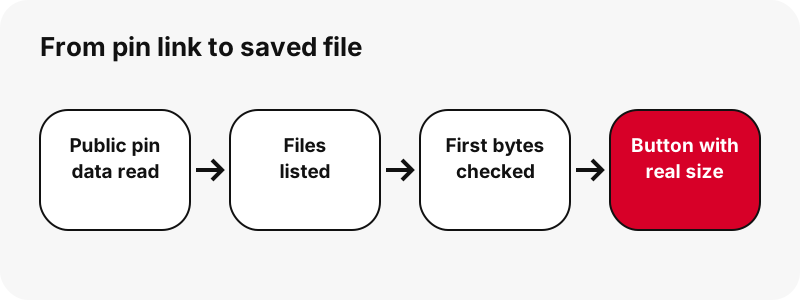
Idea pins need one extra step. Their pin data lists only a streaming playlist, so the tool looks up the matching 720p MP4 on Pinterest's servers and confirms it exists before offering it. In our local tests a single pin was listed in about 1.1 to 1.5 seconds.
Nothing is converted on the way. The file you save is the one Pinterest serves, which is why the size on the button and the size on your device match.
Can I save a whole Pinterest board?
Partly. Paste a public board link and the tool lists up to 50 of its pins, each with a thumbnail and a Get button, plus a "Get all, one by one" option.
Each pin is then prepared like a single link, so you still choose the file for each one. There is no ZIP of the whole board, secret boards cannot be read, and boards beyond 50 pins are only partly listed. Details on the board downloader page.
What can't a Pinterest saver do?
It cannot save what is not public, and it cannot make files better than Pinterest stores them. Being clear about this saves you time.
- No private pins or secret boards: the tool never signs in.
- No 1080p, 2K or 4K: Pinterest's top copy of most videos is 720p.
- No MP3 encoding: sound is saved as .m4a, copied without re-encoding.
- No GIF-to-MP4: Pinterest stores no MP4 copy of GIF pins.
- No profile download, no ZIP, no captions as files.
- No browser extension, no APK and no desktop program.
If a public pin still will not save, try Pinterest video download not working. Why private pins are off limits is on download private Pinterest videos.
Is there a Pinterest saver app?
There is no app to install: PinDownload is a website, and that is deliberate. It works in any modern browser on phones, tablets and computers.
You can add the page to your home screen so it opens like an app. The steps per device are on the Pinterest downloader app page. Be careful with files that claim to be a Pinterest saver APK; we do not publish any.
Is my data safe when I use the saver?
We ask for nothing but the pin link. There is no login, so we never see your Pinterest account, and we do not store the files you save.
Files are streamed from Pinterest's servers through a signed link that expires after one hour. The audio option works inside your own browser and uploads nothing. Our privacy page lists what the server logs.
PinDownload is independent and not affiliated with Pinterest. It adds no watermark and no ads at launch.
How should I use the pins I save?
Use saved pins for personal reference, and ask before you reuse them. The person who made a video or photo owns it, and reposting it as your own can infringe their copyright.
“If you’re a copyright owner or authorized to act on behalf of one, you can report alleged copyright infringements on Pinterest by completing a copyright report and sending it to our designated copyright agent.”
Pinterest's copyright policy explains that copyright owners can report infringing copies and that Pinterest may remove them. The US Copyright Office's fair use index sets out the factors courts weigh.
Credit the creator by name and link whenever you share with permission. Our page is it legal to download Pinterest videos answers the common questions in plain words.
More ways to save from Pinterest
Every tool below uses the same box and shows the same real sizes. Pick the one that matches what you want to keep.
Frequently asked questions
Is this Pinterest saver free?
Yes. It is free, needs no account and has no ads at launch.
How do I save a Pinterest video to my phone?
Copy the pin link, paste it above, press Download and tap the MP4 button. On iPhone it goes to Files › Downloads; on Android to your default download folder.
What is the difference between saving and downloading on Pinterest?
Saving adds the pin to one of your boards inside Pinterest. Downloading stores the actual file on your device.
Can I save Pinterest videos with sound?
Yes. The MP4 carries the clip's AAC sound track when it has one. You can also save only the sound as an .m4a file.
Does it work on iPhone?
Yes, in Safari or any other browser. No app is needed.
Can I save pins without a Pinterest account?
Yes. The tool reads public pins only and never asks you to log in.
Why are sizes shown before I download?
So you know what you get. Every size is read from the file itself, which keeps the tool honest about 720p and file weight.
Can I save private pins?
No. Private pins and secret boards cannot be read, because the tool never signs in to Pinterest.
Can I save several pins at once?
From a public board, yes: up to 50 pins are listed and can be prepared one by one. There is no ZIP download.
Will saved pins disappear if the creator deletes them?
The file you already saved stays on your device. The download link on our card, however, expires after one hour.
Does PinDownload add a watermark to saved pins?
No. Nothing is added to any video, image or GIF. Marks the creator put in the picture stay.
Is PinDownload part of Pinterest?
No. PinDownload is an independent saver, not made, endorsed or sponsored by Pinterest. It reads public pins only.
Guides
Video — Paste a pin link and save the video as MP4, up to 720p.
Sources
- Download an image — Pinterest Help Center
- Create a Pin from an image or video — Pinterest Help Center
- Copyright — Pinterest Policy
- U.S. Copyright Office Fair Use Index — U.S. Copyright Office
- Find your downloads on iPhone or iPad — Apple Support
- Find recently saved photos and videos on iPhone — Apple Support
- Download a file (Chrome on Android) — Google Chrome Help