What is a Pinterest video thumbnail, exactly?
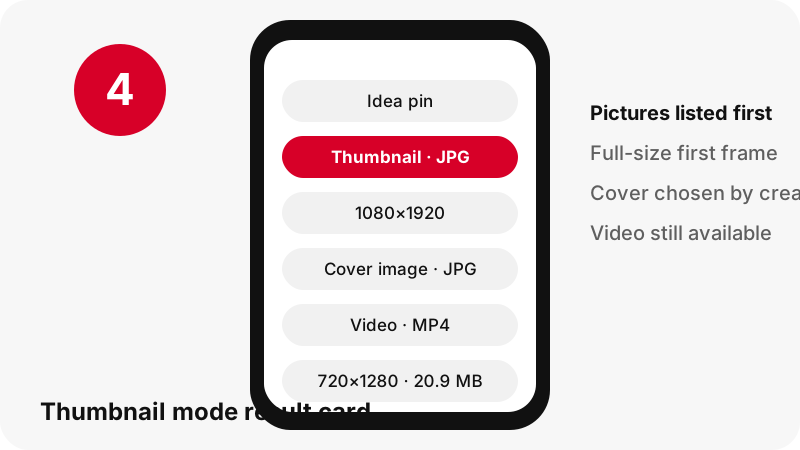
It is the still picture that stands for a video pin before anyone presses play. For each video pin, PinDownload can offer two of them: the clip's first frame, stored as a full-size image, and the pin's cover image, both as JPG.
The cover is a deliberate choice by the creator. Pinterest's own instructions for publishing a video pin include this step:
“Cover: Select Edit cover to choose a thumbnail for your video.”
So the cover may show a different moment than the opening frame, or a frame picked because it reads well at small size. The Pinterest thumbnail downloader gives you both so you can compare them side by side.
First frame or cover: which one should I save?
Save the first frame when you need the exact opening shot of the clip, and the cover when you want the image the creator chose to represent the pin. Often they match; when they do not, the difference is the point.
| Thumbnail (first frame) | Cover image | |
|---|---|---|
| What it shows | The opening frame of the video | The frame or picture set as the pin's cover |
| Who chose it | Nobody: it is simply frame one | The creator, via Edit cover |
| Format | JPG | JPG |
| Typical size in our tests | 720×1280 or 1080×1920 | Varies by pin; shown on the button |
| Best for | Matching a video edit, storyboards | Previews, playlists, references |
Both buttons appear in thumbnail mode whenever Pinterest stores them. If one is missing for a given pin, the card simply shows the one that exists.
Why can the thumbnail be sharper than the video?
Because Pinterest keeps the first-frame picture at the source size, while its video files stop at 720p. In our tests, a 90-second idea pin whose source was listed as 1080×1920 had a largest MP4 of 720×1280, yet its thumbnail picture measured the full 1080×1920.
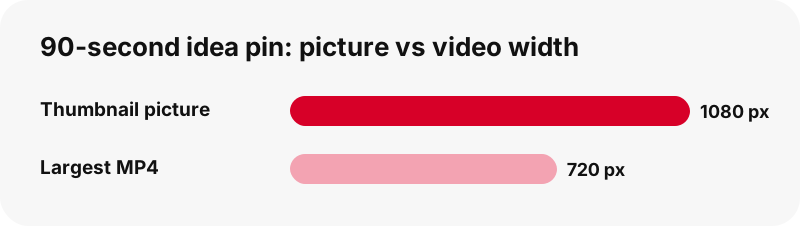
That makes the thumbnail the highest-resolution still you can get from many video pins. A frame grabbed from the 720p MP4 would carry fewer pixels than the thumbnail Pinterest already holds.
The video itself cannot go above 720p, and we say so on the video quality page. The picture is another story, which is exactly why this page exists.
What sizes do Pinterest thumbnails come in?
The size follows the video. Vertical clips give tall thumbnails, and the button prints the exact width and height read from the file. These are the numbers we measured on real pins on 2026-10-24:
| Pin tested | Thumbnail picture | Largest MP4 |
|---|---|---|
| Idea pin, 90 s (source 1080×1920) | 1080×1920 | 720×1280, 20.9 MB |
| Classic video pin, 7 s | Full-size first frame | 720×1280, 0.4 MB |
| Classic video pin, 13 s | Full-size first frame | 576×1024, 3.3 MB |
| Carousel, 13 slides | One per video slide | Video slides 720×900 |
Treat these as examples, not promises. A clip uploaded at a lower resolution has a smaller first frame, and PinDownload never enlarges it to look better on paper.
Isn't a thumbnail supposed to be small?
In general computing, yes. The usual definition, as Wikipedia puts it:
“A thumbnail is a reduced-size version of a picture or video, used to help in recognizing and organizing them, serving the same role for images as a normal text index does for words.”
On Pinterest the word covers more than the tiny tile in the grid. The tile you scroll past is a reduced copy, but behind it sits a full-size picture of the frame. A Pinterest thumbnail downloader worth using should fetch that full-size picture, not the tile, and that is what the Thumbnail button does.
Why are the pictures delivered as JPG?
Because that is how Pinterest stores video frames and covers, and a frame from a video is a photograph-like image. The MDN image format guide calls JPEG the most widely used lossy format for still images and notes it is particularly useful for photographs.
PinDownload passes the JPG along unchanged. It does not re-save it at a different quality, convert it to PNG, or strip pixels to make the download faster.
If you need a PNG for a design tool, convert a copy yourself. Converting a JPG to PNG will not add back detail, but it will stop further quality loss if you edit and re-save the image many times.
Who actually needs a Pinterest video cover?
More people than you might expect. The common cases we designed the Pinterest thumbnail downloader for:
- Creators who lost the original cover they designed and want it back from their own pin.
- Editors matching the opening frame of a clip when re-cutting their own footage.
- Teachers and presenters who need a still to stand for a video on a slide or handout.
- Planners building a storyboard or mood board from video references.
- Anyone on slow data who wants to see what a clip shows before fetching a 20 MB file.
In each case the still is the goal, not the clip. If you later need the video, the MP4 button sits further down the same card.
Can I get covers from idea pins and carousels?
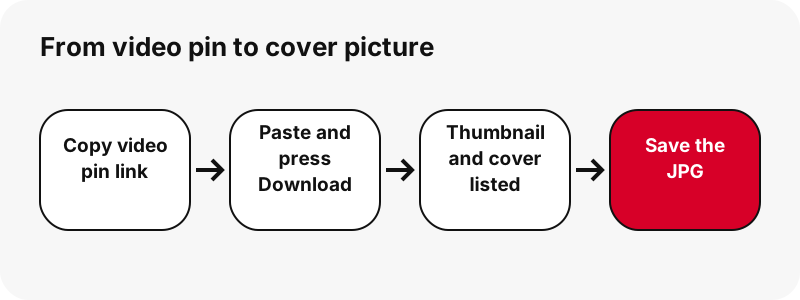
Yes. An idea pin with a video page lists its thumbnail and cover like any other video pin. A carousel lists each slide as its own item, up to 20 slides, and every video slide gets an MP4, a thumbnail and a cover.
In our tests, a 13-slide carousel was listed in about 1.8 seconds, with seven video slides at 720×900. Each of those seven came with its own still pictures, so you can collect the covers of every slide without opening each one.
The card states how many parts the pin has. For the clips themselves, the reels downloader explains the three MP4 sizes offered for idea pins.
What happens if the pin is a picture, not a video?
You get the picture itself, with a note. Picture pins have no video cover, so the card says "This pin has no video cover; here is the picture itself" and offers the original image instead.
That original is usually the better file anyway: it is the creator's upload, not the 736-px preview. The image downloader explains how originals compare with feed previews.
GIF pins behave in a similar way. They have a still JPG rather than a thumbnail and cover pair, and the GIF downloader lists that still next to the animated file.
Is a thumbnail file better than a paused screenshot?
Yes. A Pinterest thumbnail downloader returns the stored picture, while pausing a video and taking a screenshot gives you your screen at that moment: player controls, a status bar, and a resolution set by your display rather than by the source.
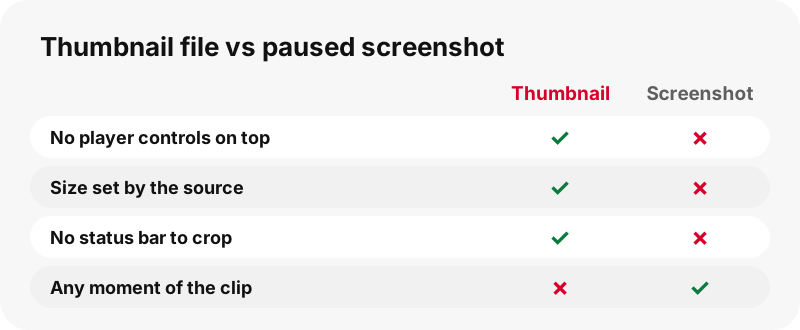
The thumbnail file is a clean JPG straight from Pinterest, with no interface on top. On a phone with a smaller screen, the screenshot can also come out with fewer pixels than the 1080×1920 thumbnail measured in our test.
A screenshot is only useful when you need a frame from the middle of the clip, which Pinterest does not store as a picture. That case is covered in the section about other frames below.
Where does the thumbnail go on iPhone and iPad?
Into the Files app. Apple says files downloaded from the internet are in the Downloads folder in Files, and in Safari the Downloads button next to the search field opens them straight away.
To choose between iCloud Drive and the device itself, Apple documents the setting under Settings › Apps › Safari › Downloads. Keeping covers on the device avoids waiting for a sync before you use them in an editing app.
Want a walkthrough with every screen? Our iPhone picture guide applies to thumbnails too, since they are ordinary JPG files.
Where does the thumbnail go on Android?
Chrome saves it to the default download location, and Google's help says all downloaded files can be found in the Files app. Chrome's menu › Downloads lists it right after the save.
Google Photos can show it with your other pictures under Collections › On this device, where folders from other apps appear. That is handy if you plan to post or edit the cover from your gallery.
The Android picture guide has the steps with screenshots, and the downloads map covers every other device.
How do I save a Pinterest cover on a computer?
Click the Thumbnail or Cover image button and your browser stores the JPG in its download folder. Google gives the Chrome defaults in its download help: \Users\<username>\Downloads on Windows and /Users/<username>/Downloads on Mac.
- Safari on Mac: Apple shows how to change the folder in Safari › Settings › General › File download location.
- Edge on Windows: the folder is shown under Settings › Downloads.
- Chromebook: files go to a temporary Downloads folder, which ChromeOS may clear when space runs low.
Desktop users who batch-collect covers may prefer Chrome's option to ask where to save each file, so every set lands in its own project folder.
Can I get a frame from the middle of the video?
Not as a ready-made picture. Pinterest stores the first frame and the cover; it does not keep stills of other moments, so no tool can download one directly.
The honest workaround is to save the MP4 and pause it where you want. On a Mac, Apple notes that QuickTime Player plays and pauses video files with onscreen controls. Any video player on other systems works the same way; take your still from the paused player.
Expect fewer pixels than the thumbnail: the MP4 tops out at 720p, while the first frame can be 1080×1920. For the clip, the Pinterest to MP4 tool shows every size before you choose.
Does a thumbnail download use much data?
Far less than the video in most cases, and the button tells you before you tap. The 90-second idea pin from our tests had a 20.9 MB MP4; if all you need is to see or keep the opening frame, the JPG avoids pulling the whole clip.
That is the practical reason to start with the Pinterest thumbnail downloader on mobile data. You can check what a video shows, decide whether it is the clip you wanted, and fetch the MP4 later on Wi-Fi.
Every number on a button is read from the file, not guessed from Pinterest's labels. If the real file is smaller or larger than listed, the button shows the real one.
Can I reuse someone's Pinterest video cover?
Treat it like any other picture: it belongs to whoever made it. Covers are often designed with titles, brand colours or faces, which makes them part of the creator's work rather than a neutral screenshot.
The U.S. Copyright Office explains that copyright protects original works, including photographs, from the moment they are fixed. Pinterest's copyright policy lets owners report copies.
Using your own cover again is fine. For anyone else's, link to the pin or ask permission before publishing. More on this in the legal guide.
What if the thumbnail button is missing or fails?
When the Pinterest thumbnail downloader shows no picture button, read the card message first; it usually names the reason. Then go through these checks:
- Confirm the pin is public by opening it in a private browser window.
- If the card says the pin has no video cover, it is a picture pin: save the original image instead.
- If the result is older than one hour, press Download again, because signed links expire.
- Paste the pin itself, not a board section or profile tab, which are not supported.
PinDownload is independent and not affiliated with Pinterest, and it cannot read private pins. The troubleshooting guide covers rarer errors.
Related Pinterest tools
The Pinterest thumbnail downloader is one of several modes over the same resolver. These cards open the others.
Frequently asked questions
Is PinDownload part of Pinterest?
No. PinDownload is independent and has no affiliation with Pinterest. It only opens public pins.
Is the Pinterest thumbnail downloader free?
Yes, with no account, no app and no login.
What is the difference between Thumbnail and Cover image?
Thumbnail is the video's first frame; Cover image is the picture set as the pin's cover, which the creator can choose with Edit cover.
How big is a Pinterest video thumbnail?
It follows the video. We measured 1080×1920 on a 90-second idea pin and full-size first frames such as 720×1280 on others. The button shows the exact size.
Why is the thumbnail bigger than the MP4?
Pinterest keeps the first-frame picture at source size, while its video files stop at 720p. So a 1080×1920 thumbnail can sit next to a 720×1280 MP4.
Can I download the thumbnail of a picture pin?
A picture pin has no video cover, so you get the original image itself, which is the better file.
Can I pick any frame of the video?
No. Only the first frame and the cover are stored as pictures. Save the MP4 and pause it in a video player for other frames.
Are thumbnails saved as PNG?
No, as JPG, the format Pinterest stores them in. They are not converted.
Can I get the covers of every slide in a carousel?
Yes. Each video slide, up to 20 per pin, has its own Thumbnail and Cover image buttons.
Does it work with pin.it links?
Yes. Short links are followed to the pin before the files are listed.
Is a watermark added?
No. Text or logos on a cover were placed there by its creator.
Can I download thumbnails from private pins?
No. Private pins and secret boards are not public, so they cannot be read.
Guides
Video — Paste a pin link and save the video as MP4, up to 720p.
Sources
- Create a Pin from an image or video — Pinterest Help Center
- Thumbnail — Wikipedia
- Image file type and format guide — MDN Web Docs (Mozilla)
- Where to find downloads on your iPhone or iPad — Apple Support
- Download items from the web using Safari on Mac — Apple Support
- Open and play a file in QuickTime Player on Mac — Apple Support
- Download a file (Chrome on Android) — Google Chrome Help
- Download a file (Chrome on a computer) — Google Chrome Help
- Copyright in General (FAQ) — U.S. Copyright Office
- Copyright — Pinterest Policy