What does Pinterest to MP4 actually mean?
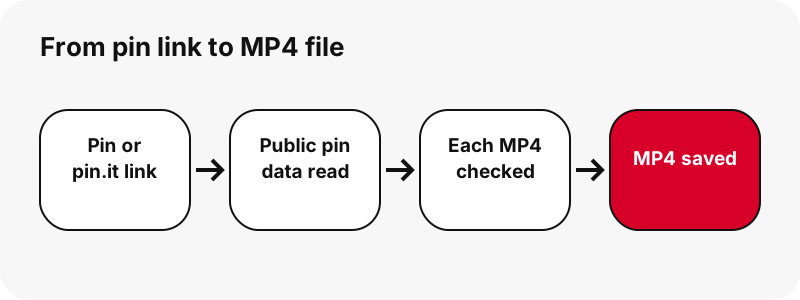
Pinterest to MP4 means getting a video pin out of Pinterest as a normal .mp4 file that any phone or computer can play offline. Pinterest does not offer a save-video button for most pins, so people look for a converter. In practice, nothing has to be converted: the MP4 already sits on Pinterest's servers.
PinDownload reads the public pin, finds that MP4, confirms the file is really there and really an MP4, and gives you a short-lived download link. The file you get is the same one Pinterest streams, byte for byte. If you want only the sound, the Pinterest to MP3 page cuts it out on your device instead.
Is it a real conversion or a copy of Pinterest's file?
It is a copy of Pinterest's own file, not a conversion. A converter would decode the video and encode it again, which costs quality and time. PinDownload skips that step on purpose. The H.264 picture and AAC sound inside the file are exactly what Pinterest encoded.
This matters because each new encode of a lossy file throws away a little more detail. Wikipedia's article on transcoding describes it as commonly a lossy process that introduces generation loss. Copying the stored MP4 avoids that loss completely, so the download is as sharp as the pin itself.
So when a page promises to convert Pinterest to MP4 in higher quality, be careful: a re-encode can only keep detail or lose it, never add it.
Which pins can be saved as MP4?
Any public pin that contains a video can be saved as MP4: classic video pins, idea pins, and the video slides of a carousel. Picture pins and GIF pins contain no MP4, and the tool tells you so instead of producing a fake video.
| Pin type | What Pinterest stores | What you get on the MP4 page |
|---|---|---|
| Classic video pin | An MP4 listed as 720p (H.264 + AAC) | That MP4, plus the thumbnail and cover as JPG |
| Idea pin (short vertical video) | A streaming playlist (HLS) with several sizes | The matching 720p MP4, plus two smaller MP4s |
| Carousel with video slides | One file per slide | One MP4 per video slide, up to 20 slides |
| Picture pin | The original image | The original image; no MP4 exists |
| GIF pin | An animated .gif and a still | The .gif; Pinterest keeps no MP4 copy of GIF pins |
Idea pins with several picture pages list each page. For animated pins, the GIF downloader explains why a GIF stays a GIF.
Why do idea pins need extra work to become MP4?
Idea pins need extra work because Pinterest's pin data lists only a streaming playlist for them, not a ready MP4 link. That playlist uses HTTP Live Streaming, where the video is sent as many short chunks that a player stitches together.
A playlist is fine for watching but useless as a file. PinDownload reads the playlist, finds the MP4 that matches its largest entry, and checks that the file exists before showing a button. If no matching MP4 answers, you see a clear message rather than a broken link.
Idea pins are often called Pinterest Reels. The Reels downloader covers multi-page idea pins in more detail.
What is inside a Pinterest MP4 file?
A Pinterest MP4 holds two tracks: H.264 video and AAC sound. MP4 itself is only the box. Wikipedia's MP4 article puts it this way:
“MP4, officially MPEG-4 Part 14, is a digital multimedia container format most commonly used to store video and audio, but it can also be used to store other data such as subtitles and still images.”
The codec inside decides what can play the file. H.264 (Advanced Video Coding) is the safe choice: Wikipedia calls it by far the most commonly used format for recording, compressing and distributing video. That is why a Pinterest MP4 plays almost everywhere without extra software.
Why are HEVC copies not offered?
HEVC copies are not offered because many devices still cannot play them smoothly. Pinterest's servers do keep HEVC (H.265) versions of some idea pins, and Pinterest's ad specs accept uploads in H.264 or H.265. But a smaller file you cannot open is not a better file.
Apple's support page on media files that do not play singles out HEIF and HEVC as formats to watch on older devices. PinDownload therefore lists only H.264 MP4s, the version that opens in a browser, a phone gallery, a video editor and a TV stick alike.
How big is a Pinterest MP4?
Most Pinterest MP4s are small: a few megabytes for a short clip, around 20 MB for a minute and a half. File size depends on length and on how much moves on screen, so two clips of the same resolution can differ a lot.
| Pin tested (2026-10-24) | Largest MP4 | File size |
|---|---|---|
| Idea pin, 9.5 s | 720×1280 | 2.2 MB (2,244,061 bytes) |
| Idea pin, 90 s | 720×1280 | 20.9 MB |
| Classic video pin, 13 s | 576×1024 | 3.3 MB |
| Classic video pin, 7 s | 720×1280 | 0.4 MB |
| Carousel video slide | 720×900 | 370–823 KB |
The card prints the exact size before you download, so there is no guessing on a capped data plan.
Which MP4 size should you pick?
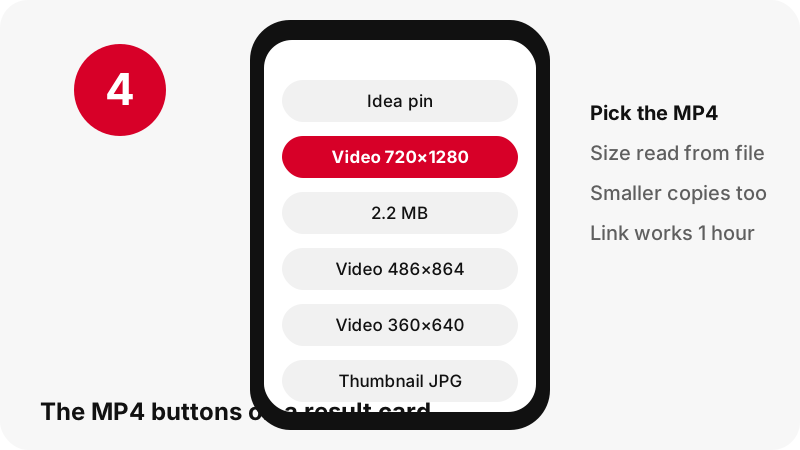
Pick the largest MP4 unless you are short on data or storage. For idea pins the card offers three H.264 files from the same ladder, and in our 9.5-second test they weighed 2.2 MB, 1.3 MB and 0.9 MB.
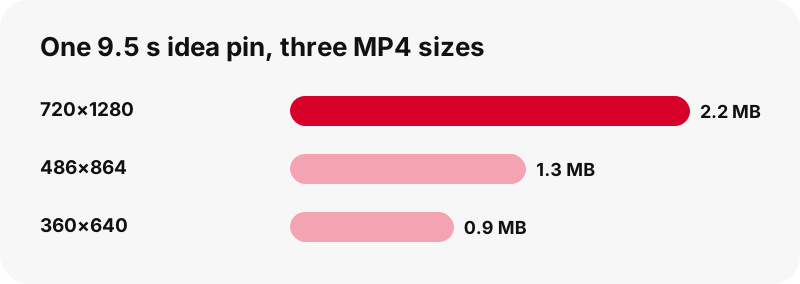
- 720×1280: best for editing, a large phone screen, a tablet or a TV.
- About 486×864: a good middle ground on mobile data; it still looks clean on a phone.
- About 360×640: for slow connections, quick previews or sending in a chat.
Classic video pins usually show one MP4 only, because Pinterest lists one. The HD video page explains how the largest file is chosen.
Can you get Pinterest MP4 in 1080p or 4K?
No. In our tests the largest MP4 Pinterest serves is 720p, and PinDownload will not pretend otherwise. Even an idea pin whose source was listed as 1080×1920 had 720×1280 as its biggest playlist entry and its biggest MP4. No 1080p file existed to download.
A file labelled 1080p or 4K from a Pinterest link can only be a 720p video stretched to a larger frame. That adds pixels, not detail. Our page on Pinterest video quality walks through why the ceiling sits at 720p and how to check a file's real size.
Does the MP4 keep the original sound?
Yes. The AAC sound track is part of the MP4 and comes through untouched. If a pin has music or a voice-over, you hear it exactly as Pinterest plays it. Some pins are uploaded silent, and those MP4s have no sound track at all.
The tool checks for this and says so. If a saved video seems mute, read the Pinterest video no sound guide before trying again: often the pin itself was posted without audio, or the phone was on silent.
Where does the MP4 go after download?
The MP4 goes wherever your browser saves downloads. Nothing is installed and PinDownload does not store a copy. The usual places are:
| Device | Where the MP4 lands | Official reference |
|---|---|---|
| iPhone / iPad | Downloads folder in the Files app | Apple Support |
| Android (Chrome) | The default download location; open the Files app to find it | Google Chrome Help |
| Windows (Edge or Chrome) | The Downloads folder | Browser settings, Downloads |
| Chromebook | The Downloads folder in Files | Chromebook Help |
Step-by-step guides exist for iPhone, Android and PC. The hub where do Pinterest downloads go covers the rest.
Will the MP4 play on my device?
Almost certainly, because H.264 with AAC is the most widely supported pairing. Microsoft's Windows Media Player troubleshooting page lists MPEG-4 (H.264) video and AAC audio among the formats it handles out of the box.
On a Chromebook, Google's supported file types page lists mp4 with H264 in its codec table. On Apple devices, Apple says its apps work with many media formats. If a file refuses to open, it is more likely an incomplete download than a format problem: download it again within the hour.
Pinterest to MP4 vs screen recording: which is better?
Downloading the MP4 is better than screen recording in almost every way. A recording captures your screen, so it adds an encode, may catch the status bar or a notification, and depends on your phone's recording settings. The downloaded file is the clip itself.
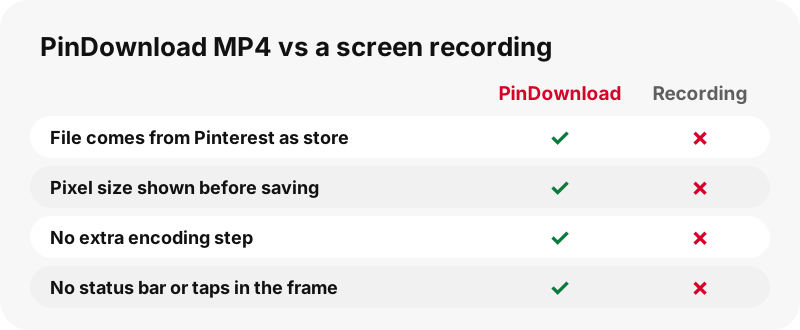
Screen recording still has one use: pins that are private or deleted, which no downloader can read. Even then, only record what you have the right to keep.
Can you edit a Pinterest MP4?
Yes. A Pinterest MP4 is a standard H.264 file, so phone editors, desktop editors and online editors all accept it. Start from the 720p file, since every cut, filter or caption you add will be re-encoded on export, and a sharper source survives that better.
Vertical clips are usually 720 pixels wide and 1280 tall. Keep that 9:16 shape if you post to vertical feeds, or crop on purpose. Before reposting anyone else's clip, read the legal guide: editing a video does not make it yours.
What the MP4 tool cannot do
Being clear about limits saves you time. The Pinterest to MP4 tool cannot:
- Read private pins or secret boards (see why private pins cannot be downloaded).
- Create a 1080p or 4K file; 720p is the top Pinterest serves.
- Turn a GIF pin into an MP4, because Pinterest stores no MP4 copy of GIF pins.
- Zip a whole board; boards list up to 50 pins, saved one by one.
- Download captions or subtitles as a separate file.
Anything else is refused with a plain message, not a silent failure.
Is it safe to save Pinterest videos as MP4?
Yes, if you use it for personal saving and respect the creator. There is no account, no Pinterest login and nothing to install, so there is nothing for the site to keep. Download links expire after one hour, and files are streamed from Pinterest's servers through that link rather than stored on ours.
Copyright is the part to take seriously. Pinterest's copyright policy says it responds to infringement reports and can remove content. Saving a clip to watch offline is very different from reuploading it as your own. When in doubt, ask the creator.
Frequently asked questions
Is Pinterest to MP4 free?
Yes. PinDownload is free, needs no account and shows no ads at launch. There is no paid tier that unlocks a better MP4.
Do I need a Pinterest to MP4 converter app?
No. There is no app to install. The tool runs in any modern browser on a phone, tablet or computer, and the MP4 is saved by the browser.
Why is my Pinterest MP4 only 720p?
Because 720p is the largest MP4 Pinterest serves for the pins we tested, including an idea pin whose source was 1080×1920. PinDownload shows the real size and never upscales.
Can I convert a Pinterest GIF to MP4?
Not with this tool. Pinterest keeps GIF pins only as .gif files, with no MP4 copy, so the GIF downloader gives you the original .gif instead.
Does Pinterest to MP4 work with pin.it links?
Yes. Paste a pin.it short link and the tool follows it to the pin. If the short link points to a board, board mode opens instead.
Is there a watermark on the MP4?
PinDownload adds nothing to the file. If the creator put a logo or text into the video itself, it is part of the picture and stays there.
Can I download several MP4s at once?
From a public board, yes: the board page lists up to 50 pins, and Get all prepares them one by one. There is no ZIP of the whole board.
Why does an idea pin show three MP4 buttons?
Pinterest keeps idea pins in several sizes for streaming. PinDownload offers the 720p MP4 plus two smaller H.264 copies, about 486×864 and 360×640, for slow connections.
The MP4 link stopped working. What happened?
Download links last one hour. Paste the pin link again to get a fresh one. If it still fails, see the not-working guide.
Can I save a private Pinterest video as MP4?
No. Only public pins can be read. Private pins and secret boards are visible only to their owner and invited people, and no honest tool can open them.
Is PinDownload part of Pinterest?
No. PinDownload is an independent tool, not affiliated with Pinterest. It reads only pins that anyone can open without logging in.
Does the MP4 have sound?
If the pin has sound, yes: the AAC track is kept as it is. Pins uploaded without sound give a silent MP4, and the audio tool tells you there is no track to save.
Guides
Video — Paste a pin link and save the video as MP4, up to 720p.
Sources
- MP4 file format — Wikipedia
- Advanced Video Coding (H.264) — Wikipedia
- HTTP Live Streaming — Wikipedia
- Transcoding — Wikipedia
- Review ad specs — Pinterest Business Help
- If a media file doesn't open or play on your Apple device — Apple Support
- Finding downloaded files on iPhone and iPad — Apple Support
- Troubleshoot Windows Media Player errors — Microsoft Support
- File types supported on your Chromebook — Google Chromebook Help
- Copyright — Pinterest Policy